> ## Documentation Index
> Fetch the complete documentation index at: https://docs.servflow.io/llms.txt
> Use this file to discover all available pages before exploring further.
# Guard rails
> How to limit what an agent may do: guards on tools, what they check, and what they cannot stop
An agent can only act through its tools. A guard is a condition you put on a tool. Every time the agent tries to use the tool, the condition is checked first, and if it is not met the tool does not run. This page is for anyone about to let other people talk to their agent.
## An example
A Discord bot has a tool that posts announcements. You want only yourself to be able to set it off. The guard on that tool is one line:
```
{{ .discord.is_super_user }}
```
Read it as "the person who sent this message is the bot's super user". Anyone can ask the bot to announce something. Only your request gets through.
## A guard checks who is asking, not what the agent says
A guard looks at the message that started the run: who sent it, where it came from, and what was in it. It never looks at what the agent wrote when it tried to use the tool.
That is on purpose. People can talk an AI model into a lot. If a guard trusted what the model said, someone could talk the model into saying the right thing. Because the guard only looks at the original message, there is nothing the model can say to get past it.
A guard can look at:
* **Who sent a Discord, Telegram, or GitHub message.** For example `{{ .discord.is_super_user }}`, or `{{ eq .github.sender_login "octocat" }}`.
* **What a webhook request contained.** For example `{{ eq (body "plan") "pro" }}`.
* **What an earlier step looked up.** For example `{{ .customer.is_admin }}`, where `customer` is a [context step](/concepts/context-fetching).
[Dynamic content](/concepts/dynamic-content) lists what each kind of entry makes available.
## What happens when a guard says no
The tool does not run. The agent is told that the tool is not allowed, and the name of the guard that stopped it. Give a guard a name that says what it is for, such as `super_user_only`.
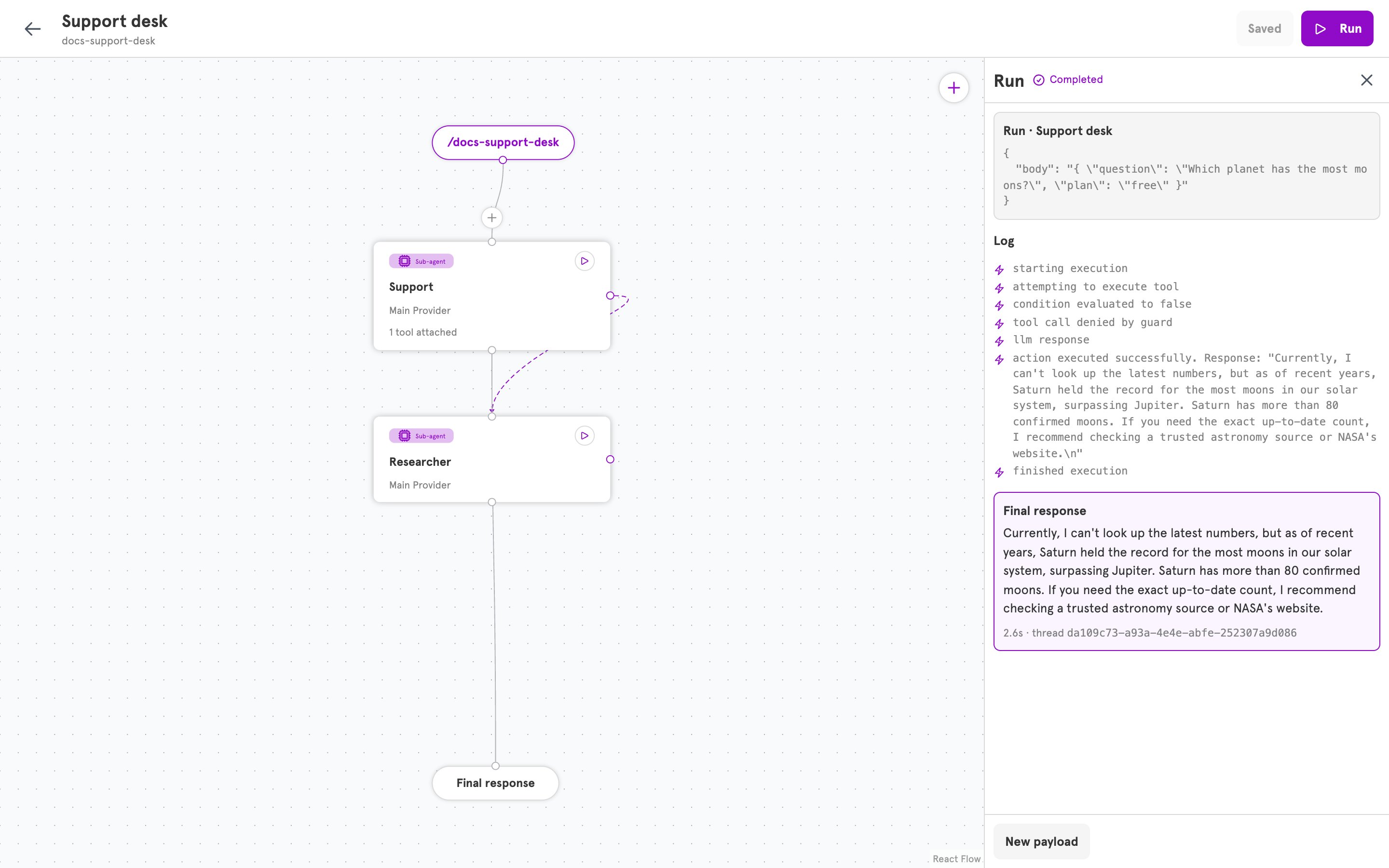
The agent then carries on. It usually tells the person it cannot do that, or answers as well as it can without the tool. In the editor, the **Log** of the run shows "condition evaluated to false" and "tool call denied by guard".
 ## More than one guard
A tool can have several guards. All of them have to pass.
## What guards do not do
**They do not decide whether the agent runs.** That is the entry's job: **Runs when** on a Discord entry, or the events on a GitHub entry. See [Entries and entry handlers](/concepts/entries). Use the entry to keep strangers out altogether, and guards to let everyone talk while limiting what some people can set off.
**They do not filter what the agent says.** A guard stops an action, not a sentence. What the agent may talk about is set in its **System prompt**.
**They do not cover reading and writing files.** The file abilities that a [workspace](/concepts/workspaces-and-files) gives are not tools you can put a guard on. Limit those in the prompt.
## Three places limits are set
| Limit | Where | Example |
| ------------------------------------------ | --------------------- | ----------------------------------------------- |
| Who can start the agent at all | The entry | Only when mentioned, only in two channels |
| What the agent may set off | A guard on a tool | Only the super user can post announcements |
| What the agent says, and how it uses files | The **System prompt** | Refuse to change notes for anyone but the owner |
## Add a guard in the dashboard
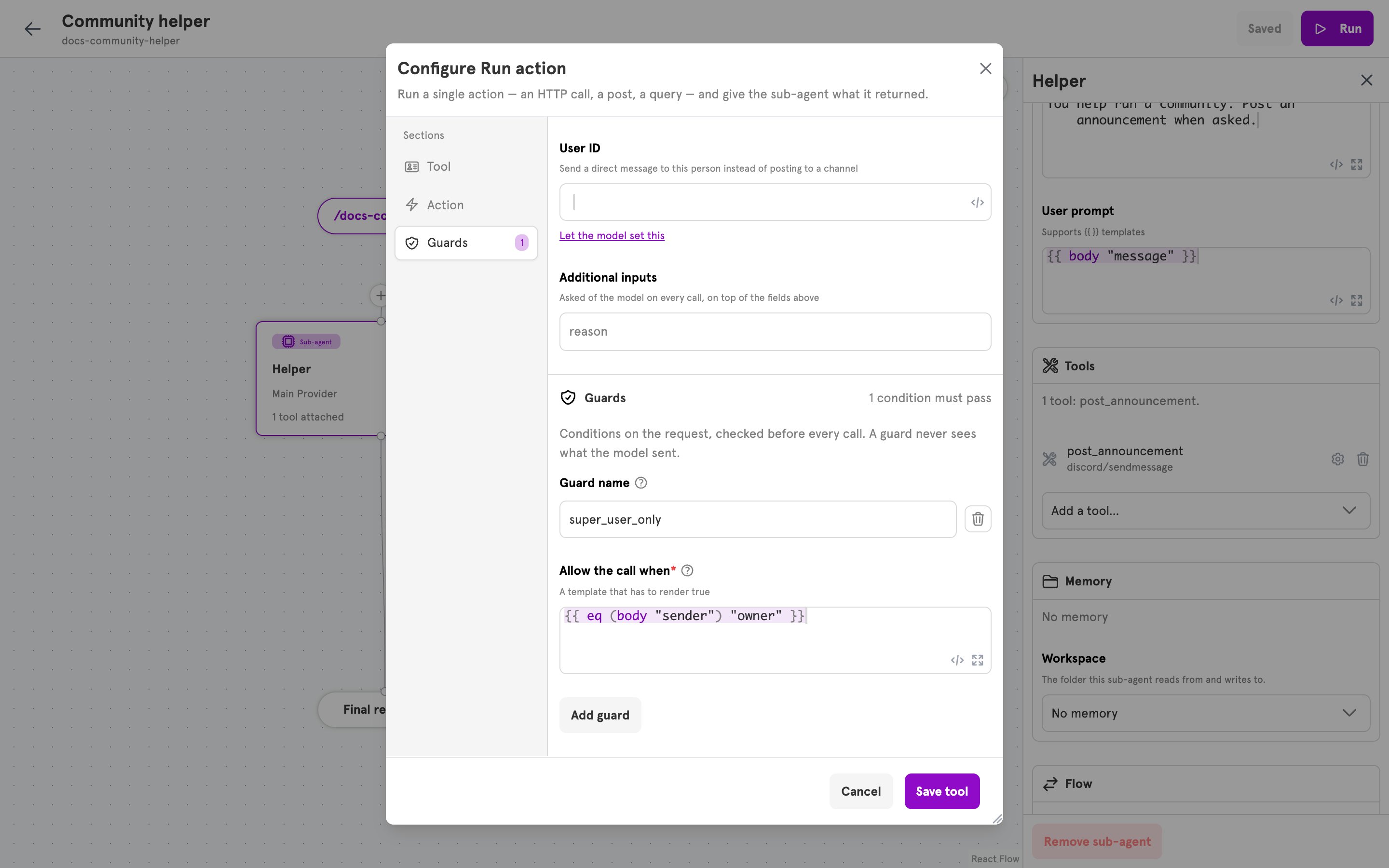
1. Open a sub-agent and click **Configure tool** on one of its tools.
2. Open the **Guards** section and click **Add guard**.
3. Enter a **Guard name**, and the condition under **Allow the call when**. The condition has to come out as `true` for the tool to run.
4. Click **Save tool**, then **Save**.
## More than one guard
A tool can have several guards. All of them have to pass.
## What guards do not do
**They do not decide whether the agent runs.** That is the entry's job: **Runs when** on a Discord entry, or the events on a GitHub entry. See [Entries and entry handlers](/concepts/entries). Use the entry to keep strangers out altogether, and guards to let everyone talk while limiting what some people can set off.
**They do not filter what the agent says.** A guard stops an action, not a sentence. What the agent may talk about is set in its **System prompt**.
**They do not cover reading and writing files.** The file abilities that a [workspace](/concepts/workspaces-and-files) gives are not tools you can put a guard on. Limit those in the prompt.
## Three places limits are set
| Limit | Where | Example |
| ------------------------------------------ | --------------------- | ----------------------------------------------- |
| Who can start the agent at all | The entry | Only when mentioned, only in two channels |
| What the agent may set off | A guard on a tool | Only the super user can post announcements |
| What the agent says, and how it uses files | The **System prompt** | Refuse to change notes for anyone but the owner |
## Add a guard in the dashboard
1. Open a sub-agent and click **Configure tool** on one of its tools.
2. Open the **Guards** section and click **Add guard**.
3. Enter a **Guard name**, and the condition under **Allow the call when**. The condition has to come out as `true` for the tool to run.
4. Click **Save tool**, then **Save**.
 ## Related
Add a tool, and a guard on it, step by step.
The fields of a guard.
What a condition can read.
Decide who can start the agent at all.
## Related
Add a tool, and a guard on it, step by step.
The fields of a guard.
What a condition can read.
Decide who can start the agent at all.