> ## Documentation Index
> Fetch the complete documentation index at: https://docs.servflow.io/llms.txt
> Use this file to discover all available pages before exploring further.
# Secrets
> What a secret is: a token or key stored once under a name, used by that name, and never shown again
A secret is a sensitive value, such as a bot token, stored once under a name. Everywhere else you use the name. The value is never shown again, not even to you. This page is for anyone holding a token or key and wondering where it goes.
 ## Why use a secret
A token is typed once. It does not appear in an agent's settings, or in a config file you might share. And when it has to be replaced, you replace it in one place.
## Where secrets are used
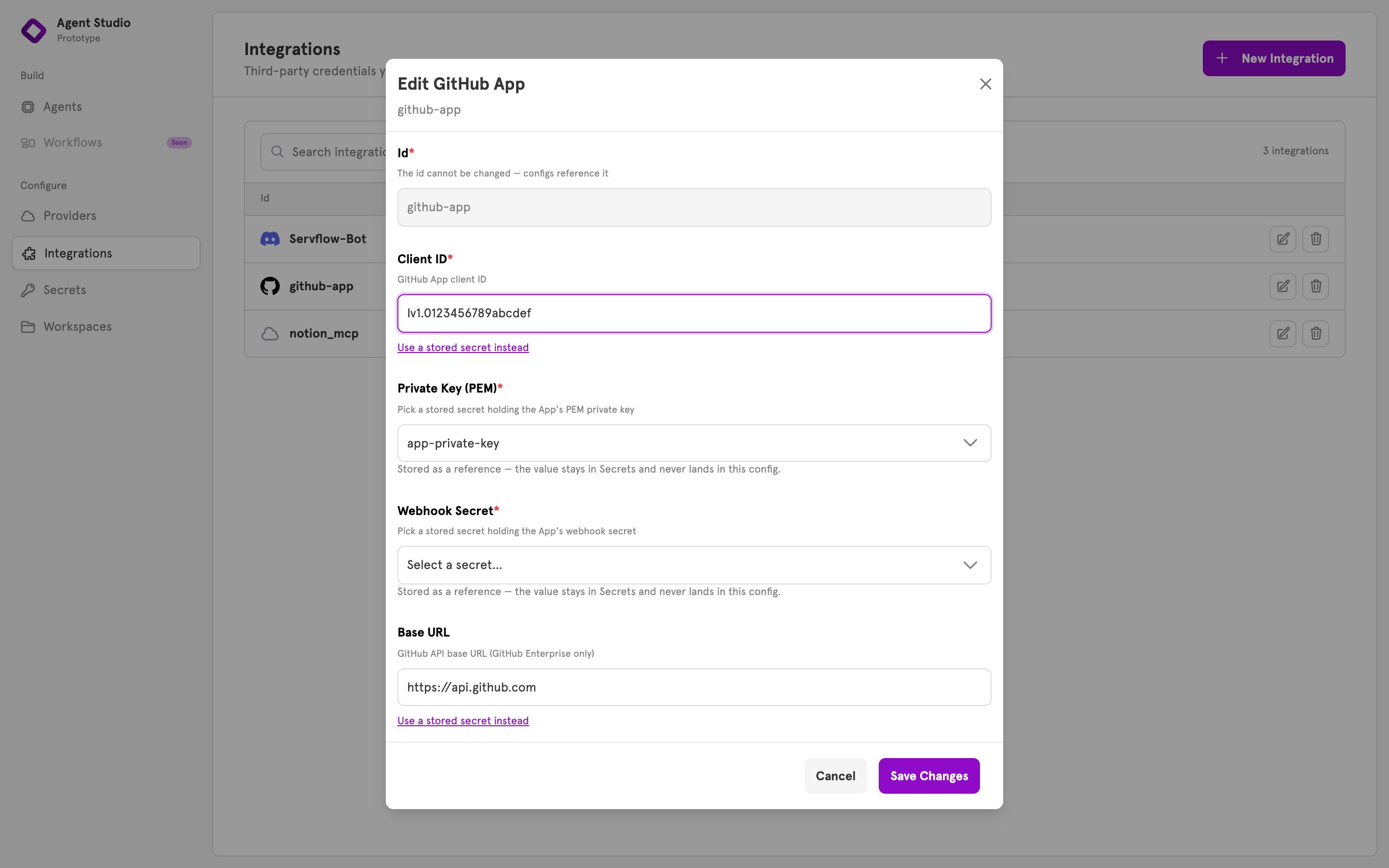
* **In an integration.** A sensitive field, such as a Discord bot's token, takes a secret chosen from a list. See [Integrations](/concepts/integrations).
* **In a prompt or a tool's settings.** Write `{{ secret "name" }}` where the value should go, for example an API key in a web request that a tool makes. See [Dynamic content](/concepts/dynamic-content).
One thing is not a secret: a provider's API key. You type that into the provider itself. See [Providers](/concepts/providers).
## You can replace a secret, not read it
Once saved, the value is not shown anywhere. If you lose the original, create a new token with the service it came from, and replace the secret's value.
A secret's name cannot be changed. If you need a different name, create a new secret.
## When a change takes effect
| Where the secret is used | When the new value is used |
| -------------------------------------------- | ---------------------------- |
| In a prompt or a tool's settings | The next time the agent runs |
| In an integration, or in an entry's settings | After you next save an agent |
So after you replace a token that an integration uses, open any agent and click **Save**.
## Deleting a secret
Whatever uses a deleted secret fails the next time it runs, and ServFlow cannot tell you in advance what that is. Check your integrations and prompts first.
## Secrets in the dashboard
**Secrets**, in the sidebar under **Configure**, lists your secrets by name, never by value. Click **New Secret** to add one. In an integration's dialog, a sensitive field lists your secrets, and **Use a stored secret instead** switches an ordinary field over to one.
## Why use a secret
A token is typed once. It does not appear in an agent's settings, or in a config file you might share. And when it has to be replaced, you replace it in one place.
## Where secrets are used
* **In an integration.** A sensitive field, such as a Discord bot's token, takes a secret chosen from a list. See [Integrations](/concepts/integrations).
* **In a prompt or a tool's settings.** Write `{{ secret "name" }}` where the value should go, for example an API key in a web request that a tool makes. See [Dynamic content](/concepts/dynamic-content).
One thing is not a secret: a provider's API key. You type that into the provider itself. See [Providers](/concepts/providers).
## You can replace a secret, not read it
Once saved, the value is not shown anywhere. If you lose the original, create a new token with the service it came from, and replace the secret's value.
A secret's name cannot be changed. If you need a different name, create a new secret.
## When a change takes effect
| Where the secret is used | When the new value is used |
| -------------------------------------------- | ---------------------------- |
| In a prompt or a tool's settings | The next time the agent runs |
| In an integration, or in an entry's settings | After you next save an agent |
So after you replace a token that an integration uses, open any agent and click **Save**.
## Deleting a secret
Whatever uses a deleted secret fails the next time it runs, and ServFlow cannot tell you in advance what that is. Check your integrations and prompts first.
## Secrets in the dashboard
**Secrets**, in the sidebar under **Configure**, lists your secrets by name, never by value. Click **New Secret** to add one. In an integration's dialog, a sensitive field lists your secrets, and **Use a stored secret instead** switches an ordinary field over to one.
 ## Related
Use a secret in an integration's field.
What an integration is and where it is used.
Where a model company's key goes.
Where secrets are stored, and how they are encrypted.
## Related
Use a secret in an integration's field.
What an integration is and where it is used.
Where a model company's key goes.
Where secrets are stored, and how they are encrypted.