> ## Documentation Index
> Fetch the complete documentation index at: https://docs.servflow.io/llms.txt
> Use this file to discover all available pages before exploring further.
# Dynamic Content
> Use the Content Editor and template syntax to create dynamic values in your ServFlow workflows
Dynamic content allows your workflows to respond to real data — request parameters, action results, headers, and more. Instead of hardcoding values, you use template syntax to reference and transform data at runtime.
You can create dynamic content in two ways:
* **Content Editor** — Visual interface in the dashboard for building dynamic values with helper panels
* **Template Syntax** — Code-based expressions in YAML configuration files
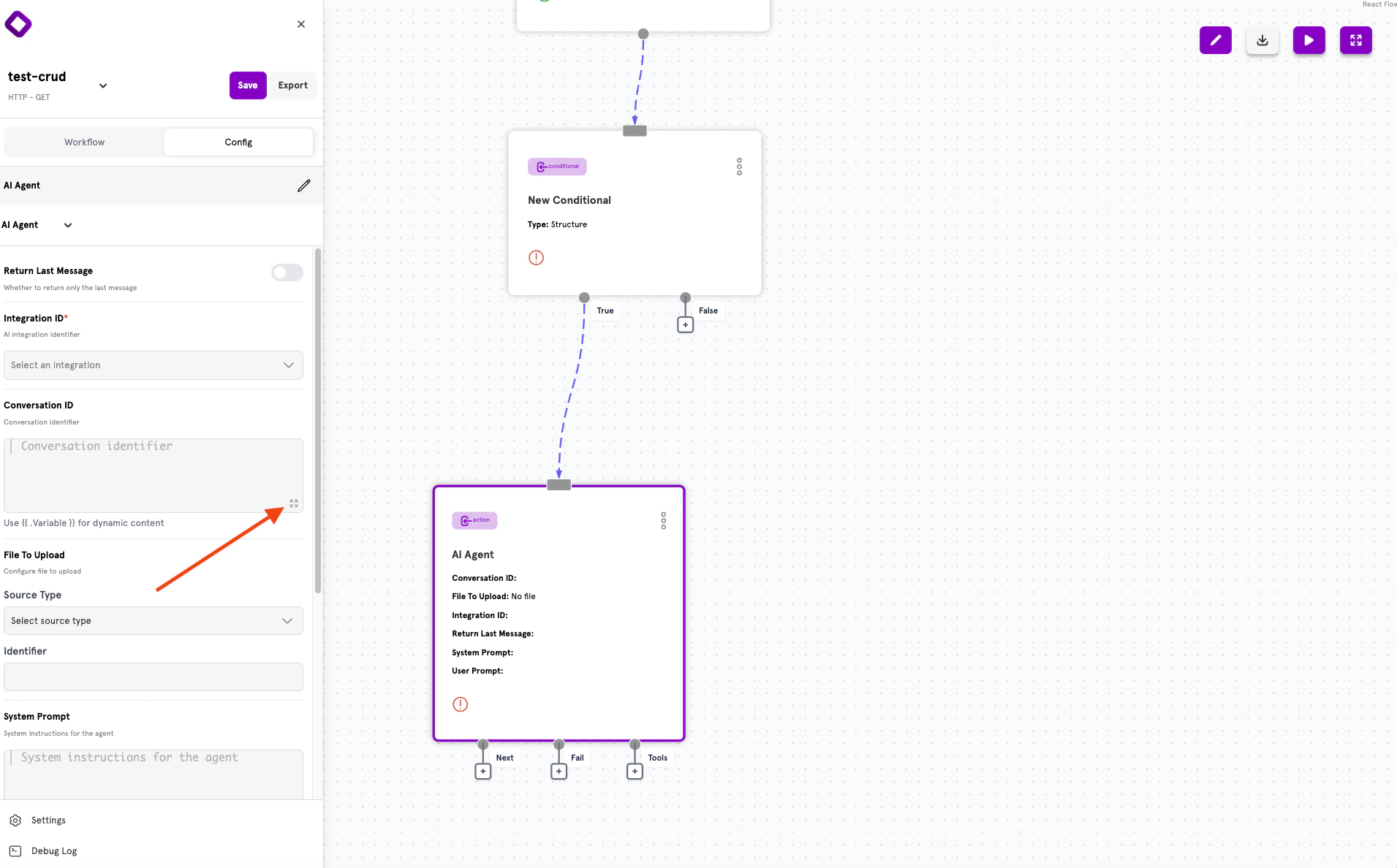
Any text input field that displays the expand icon (⋮⋮) supports dynamic content.
***
## The Content Editor
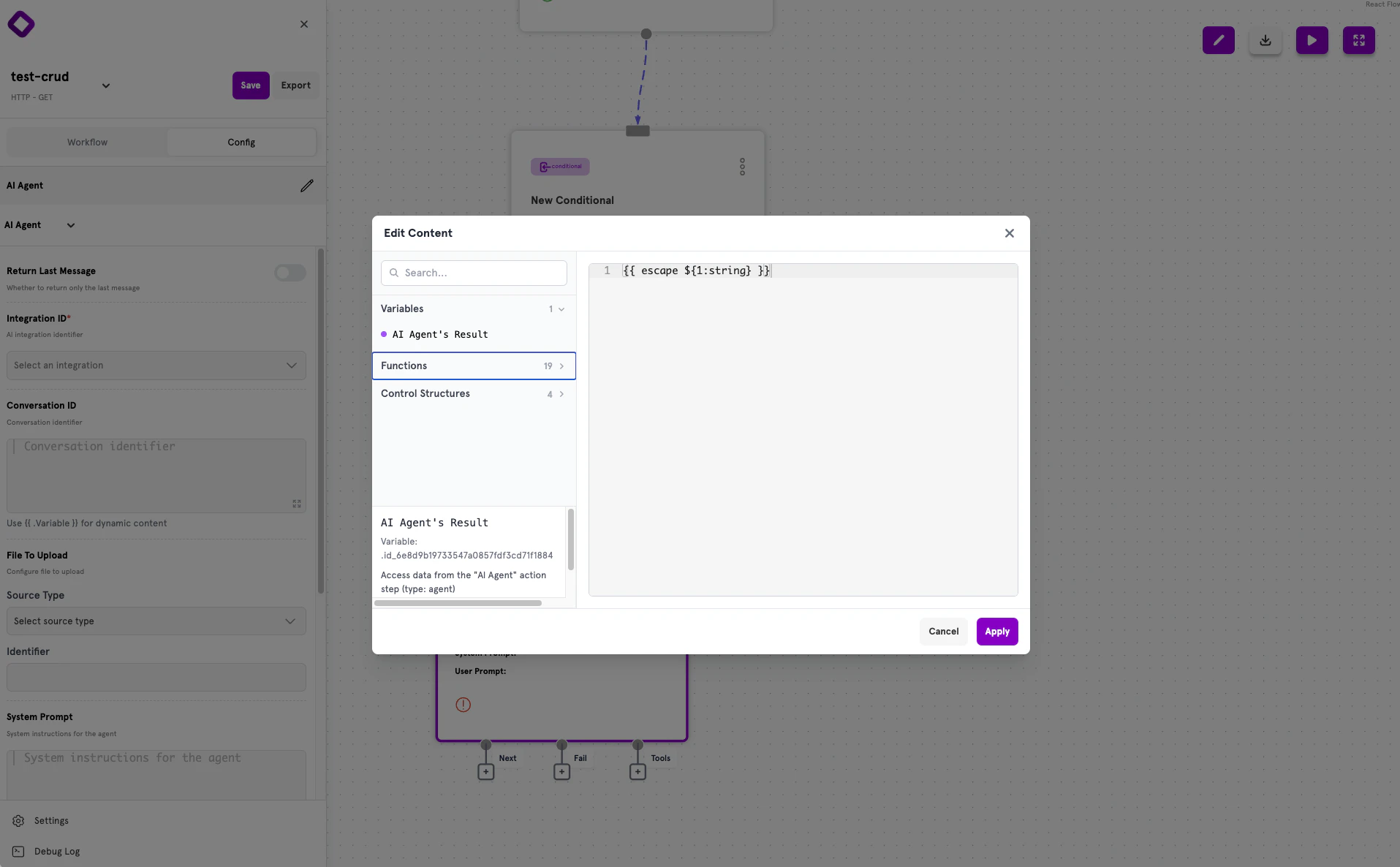
The Content Editor is a popup interface that helps you build dynamic content with access to variables, functions, and control structures.
### Opening the Content Editor
To open the Content Editor:
1. Click on any text input field in a node's configuration panel
2. Look for the **expand icon** (⋮⋮) in the corner of the field
3. Click the icon to open the "Edit Content" popup
 ### Editor Layout
The Content Editor has two main areas:
* **Left panel** — Collapsible sections for Variables, Functions, and Control Structures
* **Right panel** — Code editor where you write your dynamic content
Use the **Search** field to filter available options. Click **Apply** to save your changes or **Cancel** to discard them.
### Variables Panel
The Variables panel lists all action results available from previous steps in your workflow.
Each variable shows:
* **Name** — The action's display name (e.g., "AI Agent's Result")
* **Variable reference** — The internal ID to use in templates
* **Description** — What data the variable contains
Click a variable to insert it into the editor. Hover over a variable to see its documentation.
Variables are only available from actions that execute before the current step in your workflow. If you don't see an expected variable, check that the action is connected earlier in the flow.
### Functions Panel
The Functions panel lists 19 available functions for transforming and validating data. Functions are organized by purpose:
* String manipulation (`strip`, `upper`, `lower`, `escape`)
* Data transformation (`jsonout`, `pluck`)
* Comparison and validation (`eq`, `notempty`, `email`)
Click a function to insert it with placeholder syntax like `${1:string}`. Replace the placeholder with your actual value.
### Control Structures Panel
The Control Structures panel provides 4 structures for conditional logic:
* `if` / `else` — Conditional rendering
* `range` — Iteration over collections
* `with` — Scoped variable access
***
## Template Syntax
ServFlow uses Go's text/template syntax for dynamic values. The syntax you use depends on where you're editing.
### Full Template Mode
Most input fields use full template mode, where expressions must be wrapped in `{{ }}` delimiters.
### Editor Layout
The Content Editor has two main areas:
* **Left panel** — Collapsible sections for Variables, Functions, and Control Structures
* **Right panel** — Code editor where you write your dynamic content
Use the **Search** field to filter available options. Click **Apply** to save your changes or **Cancel** to discard them.
### Variables Panel
The Variables panel lists all action results available from previous steps in your workflow.
Each variable shows:
* **Name** — The action's display name (e.g., "AI Agent's Result")
* **Variable reference** — The internal ID to use in templates
* **Description** — What data the variable contains
Click a variable to insert it into the editor. Hover over a variable to see its documentation.
Variables are only available from actions that execute before the current step in your workflow. If you don't see an expected variable, check that the action is connected earlier in the flow.
### Functions Panel
The Functions panel lists 19 available functions for transforming and validating data. Functions are organized by purpose:
* String manipulation (`strip`, `upper`, `lower`, `escape`)
* Data transformation (`jsonout`, `pluck`)
* Comparison and validation (`eq`, `notempty`, `email`)
Click a function to insert it with placeholder syntax like `${1:string}`. Replace the placeholder with your actual value.
### Control Structures Panel
The Control Structures panel provides 4 structures for conditional logic:
* `if` / `else` — Conditional rendering
* `range` — Iteration over collections
* `with` — Scoped variable access
***
## Template Syntax
ServFlow uses Go's text/template syntax for dynamic values. The syntax you use depends on where you're editing.
### Full Template Mode
Most input fields use full template mode, where expressions must be wrapped in `{{ }}` delimiters.
 ```yaml theme={null}
# Simple variable reference
value: "{{ .fetch_user.name }}"
# Request parameter
value: "{{ param \"email\" }}"
# With transformation
value: "{{ param \"email\" | lower }}"
# Combining static and dynamic content
value: "Hello, {{ .fetch_user.name }}!"
```
### Expression Mode
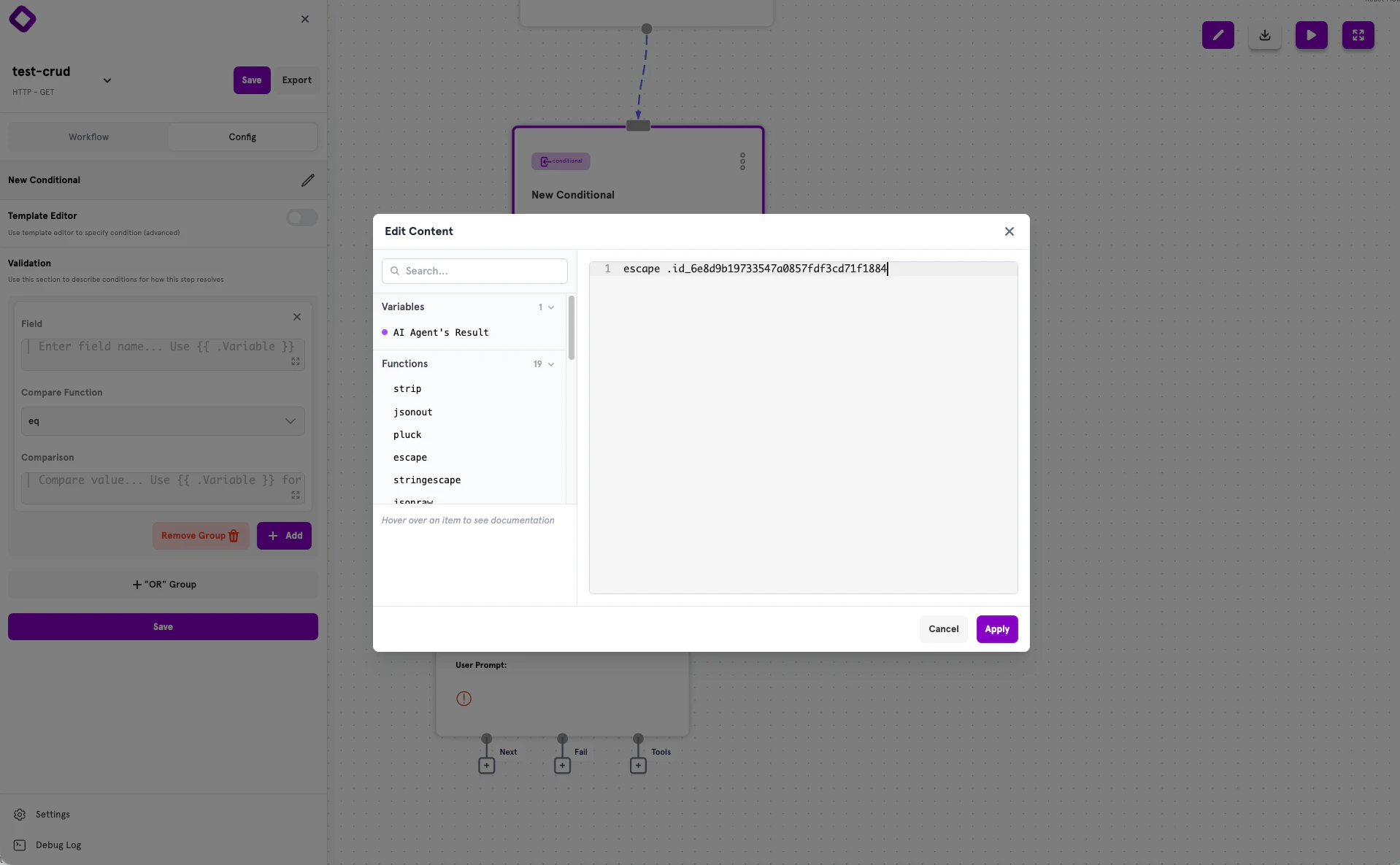
Structured conditional fields (Field and Comparison inputs) use expression mode, where you write raw expressions **without** `{{ }}` delimiters. The system automatically wraps your expression.
```yaml theme={null}
# Simple variable reference
value: "{{ .fetch_user.name }}"
# Request parameter
value: "{{ param \"email\" }}"
# With transformation
value: "{{ param \"email\" | lower }}"
# Combining static and dynamic content
value: "Hello, {{ .fetch_user.name }}!"
```
### Expression Mode
Structured conditional fields (Field and Comparison inputs) use expression mode, where you write raw expressions **without** `{{ }}` delimiters. The system automatically wraps your expression.
 ```yaml theme={null}
# In structured conditionals, write raw expressions:
content: .user.email
comparison: param "email"
# NOT like this:
content: "{{ .user.email }}" # Wrong for structured conditionals
```
See the [Conditionals](/references/concepts/conditionals) documentation for details on structured vs template conditionals.
***
## Accessing Data
Dynamic content can reference data from multiple sources throughout your workflow.
### Action Results
Access results from previous actions using the action ID with a dot prefix:
```yaml theme={null}
# Full result from action 'fetch_user'
value: "{{ .fetch_user }}"
# Nested field access
value: "{{ .fetch_user.email }}"
# Array index access
value: "{{ index .fetch_user 0 }}"
# Field from array element
value: "{{ (index .fetch_users 0).email }}"
```
### Request Parameters
Access request body fields and query parameters with the `param` function:
```yaml theme={null}
# Get a parameter
value: "{{ param \"email\" }}"
# Use in filters
filters:
- field: email
operator: eq
value: "{{ param \"email\" }}"
```
### Request Headers
Access HTTP headers with the `header` function:
```yaml theme={null}
# Get Authorization header
value: "{{ header \"Authorization\" }}"
# Extract Bearer token
value: "{{ header \"Authorization\" | trimPrefix \"Bearer \" }}"
```
### Tool Parameters
When an action is called from an AI agent's workflow tool, access tool parameters:
```yaml theme={null}
# Get tool parameter
value: "{{ tool_param \"search_term\" }}"
```
### Secrets
Access securely stored environment variables with the `secret` function:
```yaml theme={null}
# Get secret value
value: "{{ secret \"API_KEY\" }}"
value: "{{ secret \"DATABASE_URL\" }}"
```
***
## Available Functions
### String Functions
| Function | Description | Example |
| -------------- | ------------------------- | --------------------------------------------- |
| `trimPrefix` | Remove prefix from string | `{{ header "Auth" \| trimPrefix "Bearer " }}` |
| `trimSuffix` | Remove suffix from string | `{{ .path \| trimSuffix "/" }}` |
| `upper` | Convert to uppercase | `{{ .name \| upper }}` |
| `lower` | Convert to lowercase | `{{ .email \| lower }}` |
| `replace` | Replace substring | `{{ replace .text "old" "new" -1 }}` |
| `printf` | Format string | `{{ printf "%s-%d" .name .id }}` |
| `strip` | Strip whitespace | `{{ .input \| strip }}` |
| `escape` | Escape special characters | `{{ .text \| escape }}` |
| `stringescape` | Escape string for JSON | `{{ param "query" \| stringescape }}` |
### Comparison Functions
| Function | Description | Example |
| -------- | --------------------- | ---------------------------- |
| `eq` | Equal | `{{ eq .status "active" }}` |
| `ne` | Not equal | `{{ ne .status "deleted" }}` |
| `lt` | Less than | `{{ lt .age 18 }}` |
| `le` | Less than or equal | `{{ le .price 100 }}` |
| `gt` | Greater than | `{{ gt .count 0 }}` |
| `ge` | Greater than or equal | `{{ ge .balance 0 }}` |
### Logical Functions
| Function | Description | Example |
| -------- | ----------- | --------------------------------- |
| `and` | Logical AND | `{{ and .isActive .isVerified }}` |
| `or` | Logical OR | `{{ or .isAdmin .isModerator }}` |
| `not` | Logical NOT | `{{ not .isDeleted }}` |
### Collection Functions
| Function | Description | Example |
| -------- | ------------------------ | ---------------------------- |
| `len` | Get length | `{{ len .items }}` |
| `index` | Get element by index | `{{ index .items 0 }}` |
| `first` | Get first element | `{{ first .items }}` |
| `last` | Get last element | `{{ last .items }}` |
| `pluck` | Extract field from array | `{{ pluck .users "email" }}` |
### Data Functions
| Function | Description | Example |
| --------- | ---------------------- | ------------------------------- |
| `jsonout` | JSON encode value | `{{ jsonout .data }}` |
| `jsonraw` | Raw JSON output | `{{ jsonraw .data }}` |
| `default` | Default value if empty | `{{ default .name "Unknown" }}` |
| `now` | Current timestamp | `{{ now }}` |
### Validation Functions
These functions are primarily used in conditionals and collect validation errors:
| Function | Description | Example |
| ---------- | --------------------- | ------------------------------------------------------- |
| `email` | Validate email format | `{{ email (param "email") "Email" }}` |
| `empty` | Check if empty | `{{ empty .field "Field" }}` |
| `notempty` | Check if not empty | `{{ notempty (param "name") "Name" true }}` |
| `bcrypt` | Compare bcrypt hash | `{{ bcrypt (param "password") .user.hash "Password" }}` |
***
## Pipelines
Chain multiple functions together using the pipe operator `|`. Data flows left to right through each function:
```yaml theme={null}
# Chain multiple operations
value: "{{ param \"email\" | lower | trimPrefix \"mailto:\" }}"
# Format and transform
value: "{{ .user.name | upper }}"
# Default with transformation
value: "{{ param \"status\" | default \"pending\" | upper }}"
# Complex pipeline
value: "{{ header \"Authorization\" | trimPrefix \"Bearer \" | strip }}"
```
***
## Control Structures
### If/Else
Conditionally render content based on a value:
```yaml theme={null}
value: "{{ if .isAdmin }}Admin{{ else }}User{{ end }}"
# With comparison
value: "{{ if eq .status \"active\" }}Active{{ else }}Inactive{{ end }}"
```
### With Block
Create a scoped context for nested access:
```yaml theme={null}
value: "{{ with .user }}{{ .name }} ({{ .email }}){{ end }}"
```
### Range (Iteration)
Iterate over collections:
```yaml theme={null}
value: "{{ range .items }}{{ .name }}, {{ end }}"
```
For complex array processing, consider using a JavaScript action instead of range loops in templates.
***
## Common Patterns
### Authentication Token Extraction
```yaml theme={null}
value: "{{ header \"Authorization\" | trimPrefix \"Bearer \" }}"
```
### Default Values
```yaml theme={null}
# Default for missing parameter
value: "{{ default (param \"page\") \"1\" }}"
# Default for missing field
value: "{{ default .user.avatar \"/images/default.png\" }}"
```
### Safe Strings for JSON
```yaml theme={null}
# Escape user input in JSON
filterQuery: '{"name": "{{ param "name" | stringescape }}"}'
# Convert object to JSON
template: '{"data": {{ jsonout .results }}}'
```
### Combining Multiple Values
```yaml theme={null}
# String concatenation
value: "{{ param \"firstName\" }} {{ param \"lastName\" }}"
# Using printf
value: "{{ printf \"%s %s\" (param \"firstName\") (param \"lastName\") }}"
```
### Conditional Display
```yaml theme={null}
value: "{{ if .user.isVerified }}Verified{{ else }}Unverified{{ end }}"
```
### Checking Collection Length
```yaml theme={null}
# Has results
expression: "{{ gt (len .fetch_results) 0 }}"
# Is empty
expression: "{{ eq (len .items) 0 }}"
```
***
## Best Practices
1. **Use direct action access** — Prefer `.actionID` syntax for accessing action results
2. **Escape user input** — Always use `stringescape` for user input in JSON or database queries
3. **Provide defaults** — Use the `default` function for optional values to prevent empty outputs
4. **Keep templates simple** — Move complex logic to JavaScript actions when templates become difficult to read
5. **Use multi-line YAML** — For complex templates, use `|` for better readability:
```yaml theme={null}
value: |
{{ if .user }}
Hello, {{ .user.name }}!
{{ else }}
Hello, Guest!
{{ end }}
```
6. **Validate early** — Use conditionals to validate inputs before processing them in actions
***
## Next Steps
Learn about actions — the building blocks of workflows.
Add branching logic to your workflows.
See the complete ServFlow configuration options.
Securely store credentials for your workflows.
```yaml theme={null}
# In structured conditionals, write raw expressions:
content: .user.email
comparison: param "email"
# NOT like this:
content: "{{ .user.email }}" # Wrong for structured conditionals
```
See the [Conditionals](/references/concepts/conditionals) documentation for details on structured vs template conditionals.
***
## Accessing Data
Dynamic content can reference data from multiple sources throughout your workflow.
### Action Results
Access results from previous actions using the action ID with a dot prefix:
```yaml theme={null}
# Full result from action 'fetch_user'
value: "{{ .fetch_user }}"
# Nested field access
value: "{{ .fetch_user.email }}"
# Array index access
value: "{{ index .fetch_user 0 }}"
# Field from array element
value: "{{ (index .fetch_users 0).email }}"
```
### Request Parameters
Access request body fields and query parameters with the `param` function:
```yaml theme={null}
# Get a parameter
value: "{{ param \"email\" }}"
# Use in filters
filters:
- field: email
operator: eq
value: "{{ param \"email\" }}"
```
### Request Headers
Access HTTP headers with the `header` function:
```yaml theme={null}
# Get Authorization header
value: "{{ header \"Authorization\" }}"
# Extract Bearer token
value: "{{ header \"Authorization\" | trimPrefix \"Bearer \" }}"
```
### Tool Parameters
When an action is called from an AI agent's workflow tool, access tool parameters:
```yaml theme={null}
# Get tool parameter
value: "{{ tool_param \"search_term\" }}"
```
### Secrets
Access securely stored environment variables with the `secret` function:
```yaml theme={null}
# Get secret value
value: "{{ secret \"API_KEY\" }}"
value: "{{ secret \"DATABASE_URL\" }}"
```
***
## Available Functions
### String Functions
| Function | Description | Example |
| -------------- | ------------------------- | --------------------------------------------- |
| `trimPrefix` | Remove prefix from string | `{{ header "Auth" \| trimPrefix "Bearer " }}` |
| `trimSuffix` | Remove suffix from string | `{{ .path \| trimSuffix "/" }}` |
| `upper` | Convert to uppercase | `{{ .name \| upper }}` |
| `lower` | Convert to lowercase | `{{ .email \| lower }}` |
| `replace` | Replace substring | `{{ replace .text "old" "new" -1 }}` |
| `printf` | Format string | `{{ printf "%s-%d" .name .id }}` |
| `strip` | Strip whitespace | `{{ .input \| strip }}` |
| `escape` | Escape special characters | `{{ .text \| escape }}` |
| `stringescape` | Escape string for JSON | `{{ param "query" \| stringescape }}` |
### Comparison Functions
| Function | Description | Example |
| -------- | --------------------- | ---------------------------- |
| `eq` | Equal | `{{ eq .status "active" }}` |
| `ne` | Not equal | `{{ ne .status "deleted" }}` |
| `lt` | Less than | `{{ lt .age 18 }}` |
| `le` | Less than or equal | `{{ le .price 100 }}` |
| `gt` | Greater than | `{{ gt .count 0 }}` |
| `ge` | Greater than or equal | `{{ ge .balance 0 }}` |
### Logical Functions
| Function | Description | Example |
| -------- | ----------- | --------------------------------- |
| `and` | Logical AND | `{{ and .isActive .isVerified }}` |
| `or` | Logical OR | `{{ or .isAdmin .isModerator }}` |
| `not` | Logical NOT | `{{ not .isDeleted }}` |
### Collection Functions
| Function | Description | Example |
| -------- | ------------------------ | ---------------------------- |
| `len` | Get length | `{{ len .items }}` |
| `index` | Get element by index | `{{ index .items 0 }}` |
| `first` | Get first element | `{{ first .items }}` |
| `last` | Get last element | `{{ last .items }}` |
| `pluck` | Extract field from array | `{{ pluck .users "email" }}` |
### Data Functions
| Function | Description | Example |
| --------- | ---------------------- | ------------------------------- |
| `jsonout` | JSON encode value | `{{ jsonout .data }}` |
| `jsonraw` | Raw JSON output | `{{ jsonraw .data }}` |
| `default` | Default value if empty | `{{ default .name "Unknown" }}` |
| `now` | Current timestamp | `{{ now }}` |
### Validation Functions
These functions are primarily used in conditionals and collect validation errors:
| Function | Description | Example |
| ---------- | --------------------- | ------------------------------------------------------- |
| `email` | Validate email format | `{{ email (param "email") "Email" }}` |
| `empty` | Check if empty | `{{ empty .field "Field" }}` |
| `notempty` | Check if not empty | `{{ notempty (param "name") "Name" true }}` |
| `bcrypt` | Compare bcrypt hash | `{{ bcrypt (param "password") .user.hash "Password" }}` |
***
## Pipelines
Chain multiple functions together using the pipe operator `|`. Data flows left to right through each function:
```yaml theme={null}
# Chain multiple operations
value: "{{ param \"email\" | lower | trimPrefix \"mailto:\" }}"
# Format and transform
value: "{{ .user.name | upper }}"
# Default with transformation
value: "{{ param \"status\" | default \"pending\" | upper }}"
# Complex pipeline
value: "{{ header \"Authorization\" | trimPrefix \"Bearer \" | strip }}"
```
***
## Control Structures
### If/Else
Conditionally render content based on a value:
```yaml theme={null}
value: "{{ if .isAdmin }}Admin{{ else }}User{{ end }}"
# With comparison
value: "{{ if eq .status \"active\" }}Active{{ else }}Inactive{{ end }}"
```
### With Block
Create a scoped context for nested access:
```yaml theme={null}
value: "{{ with .user }}{{ .name }} ({{ .email }}){{ end }}"
```
### Range (Iteration)
Iterate over collections:
```yaml theme={null}
value: "{{ range .items }}{{ .name }}, {{ end }}"
```
For complex array processing, consider using a JavaScript action instead of range loops in templates.
***
## Common Patterns
### Authentication Token Extraction
```yaml theme={null}
value: "{{ header \"Authorization\" | trimPrefix \"Bearer \" }}"
```
### Default Values
```yaml theme={null}
# Default for missing parameter
value: "{{ default (param \"page\") \"1\" }}"
# Default for missing field
value: "{{ default .user.avatar \"/images/default.png\" }}"
```
### Safe Strings for JSON
```yaml theme={null}
# Escape user input in JSON
filterQuery: '{"name": "{{ param "name" | stringescape }}"}'
# Convert object to JSON
template: '{"data": {{ jsonout .results }}}'
```
### Combining Multiple Values
```yaml theme={null}
# String concatenation
value: "{{ param \"firstName\" }} {{ param \"lastName\" }}"
# Using printf
value: "{{ printf \"%s %s\" (param \"firstName\") (param \"lastName\") }}"
```
### Conditional Display
```yaml theme={null}
value: "{{ if .user.isVerified }}Verified{{ else }}Unverified{{ end }}"
```
### Checking Collection Length
```yaml theme={null}
# Has results
expression: "{{ gt (len .fetch_results) 0 }}"
# Is empty
expression: "{{ eq (len .items) 0 }}"
```
***
## Best Practices
1. **Use direct action access** — Prefer `.actionID` syntax for accessing action results
2. **Escape user input** — Always use `stringescape` for user input in JSON or database queries
3. **Provide defaults** — Use the `default` function for optional values to prevent empty outputs
4. **Keep templates simple** — Move complex logic to JavaScript actions when templates become difficult to read
5. **Use multi-line YAML** — For complex templates, use `|` for better readability:
```yaml theme={null}
value: |
{{ if .user }}
Hello, {{ .user.name }}!
{{ else }}
Hello, Guest!
{{ end }}
```
6. **Validate early** — Use conditionals to validate inputs before processing them in actions
***
## Next Steps
Learn about actions — the building blocks of workflows.
Add branching logic to your workflows.
See the complete ServFlow configuration options.
Securely store credentials for your workflows.