> ## Documentation Index
> Fetch the complete documentation index at: https://docs.servflow.io/llms.txt
> Use this file to discover all available pages before exploring further.
# Tools
> Every tool type a sub-agent can call: its configuration fields, what the model sends, the rules a config has to pass, guards, and the built-in file tools
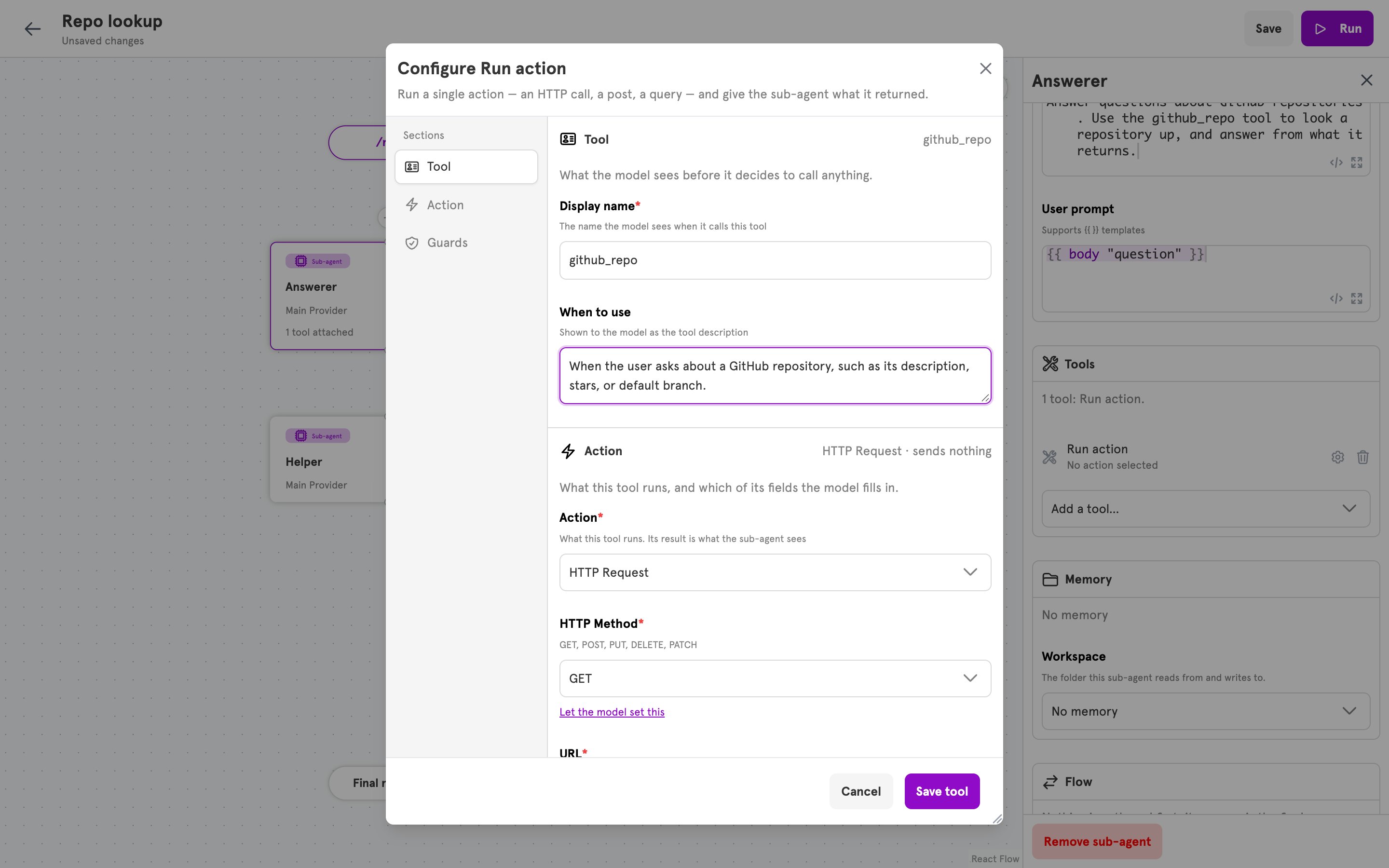
A tool is something a sub-agent's model can call during a run. Each sub-agent lists its tools under `tools` in the agent config. This page lists every tool type, its fields, guards, the built-in tools every sub-agent has, and the errors a tool config can be refused with. `servflowai resource agent schema` prints the same shapes as JSON Schema. To attach a tool in the dashboard, see [Add a tool to an agent](/guides/add-a-tool).
## Fields every tool has
| Key | Dashboard label | Type | Required | Description |
| ------------------------------------------------------------- | ---------------------------- | ------------------------- | ------------------------------------------- | ----------------------------------------------------------------------------------------------------------------------- |
| `type` | chosen under **Add a tool…** | string | Yes | One of `action`, `mcp`, `agent`, `agent_task`. |
| `name` | Display name | string | Yes for `action`, `agent`, and `agent_task` | The name the model calls the tool by. Two tools on one sub-agent with the same name replace each other. |
| `description` | When to use | string | No | Shown to the model as the tool description. |
| `params` | Additional inputs | string list | No | Inputs the model is asked for on every call. Each name holds letters, digits, `_`, or `-`. Not allowed on `agent_task`. |
| `guards` | Guards | list of [guards](#guards) | No | Conditions on the request that must all pass before the tool runs. |
| `actionConfig`, `mcpConfig`, `agentConfig`, `agentTaskConfig` | the dialog's middle section | object | The one that matches `type` | The type's own fields, described below. |
In the dashboard, a tool is edited in one dialog with three sections: **Tool** holds `name` and `description`, the middle section holds the type's own fields, and **Guards** holds `guards`.
 ## Types
| `type` | Dashboard label | Config | What the model sends | What comes back |
| --------------------------- | --------------- | ----------------- | ------------------------------------- | ---------------------------------- |
| [`action`](#action) | Run action | `actionConfig` | The fields handed to it, and `params` | What the action returned. |
| [`mcp`](#mcp) | MCP server | `mcpConfig` | What each allowed tool declares | The server's reply. |
| [`agent`](#agent) | Call sub-agent | `agentConfig` | `params` | The called sub-agent's reply. |
| [`agent_task`](#agent_task) | Agent Task Tool | `agentTaskConfig` | `instruction` | Nothing. The task runs on its own. |
### action
Runs one action when the model calls the tool. The action is not a step in the agent's flow. It is built and run for the call, and its result is the tool result.
| Key | Dashboard label | Type | Required | Description |
| --------------------- | ------------------- | --------------------------- | -------- | ----------------------------------------------------------------------------------------------------------------------------------------------------------------------------------------------------------------------------------------------------------------- |
| `actionConfig.type` | Action | string | Yes | An action type, such as `http`. Every registered action except `parallel`, `stub`, and `agent`. `servflowai resource action list` prints them. The dashboard's list also shows Save Data, which the server does not register, so a tool that names it is refused. |
| `actionConfig.config` | the action's fields | map of field to field value | No | One entry per field of the action. `servflowai resource action describe ` prints an action's fields. |
Each field value is an object with two keys.
| Key | Type | Description |
| ------- | ---------------- | --------------------------------------------------------------------------------------------------------------------------------------------------------------------------------------------------------- |
| `type` | `raw` or `param` | `raw`: you set the value. `param`: the model fills the field when it calls. In the dashboard, **Let the model set this** and **Set a fixed value instead** switch between the two. |
| `value` | any | For `raw`, the value, in the type the action declares for the field. A string is a template, resolved on every call. For `param`, the name of the input the model sends. Empty means the field's own key. |
Inputs the model is asked for:
* Every name in `params`, in order, then every field of type `param`, then every `tool_param ""` call found inside a `raw` string value.
* An input that fills a field is required when the action declares any field it fills as required. An input that comes only from `params` or from a `tool_param` call is always required.
* An input that fills a select field is described to the model with the field's allowed values.
* Every input reaches the action as a string. A template reads it with `{{ tool_param "" }}`.
In the dashboard, a field that takes an integration, a boolean, or a structured value has no **Let the model set this** link. A structured field, such as HTTP Request's **Headers**, is not editable there and is set from a file.
```yaml theme={null}
tools:
- type: action
name: github_repo
description: When the user asks about a GitHub repository, such as its description, stars, or default branch.
params:
- repo
actionConfig:
type: http
config:
method:
type: raw
value: GET
url:
type: raw
value: 'https://api.github.com/repos/{{ tool_param "repo" }}'
guards:
- name: pro_plan_only
expression: '{{ eq (body "plan") "pro" }}'
```
### mcp
Offers the model tools from a Model Context Protocol server. Each name in `toolsList` becomes one tool, with the name, description, and inputs the server declares for it.
| Key | Dashboard label | Type | Required | Description |
| ------------------------------- | -------------------- | ----------------------- | ----------------- | -------------------------------------------------------------------------------------------------------------------------------------------------------------- |
| `mcpConfig.endpoint` | Server endpoint | string | Yes | The server's URL. |
| `mcpConfig.toolsList` | Allowed tools | string list | Yes, at least one | The server's tools that are offered to the model. An empty list offers nothing and is refused. A tool the server adds later is not offered until it is listed. |
| `mcpConfig.token` | Access token | object | No | Where the bearer token comes from. Exactly one of `integrationId`, `secretId`, or `token`. |
| `mcpConfig.token.integrationId` | Integration | string | No | A stored integration connected through OAuth, such as [`notion_mcp`](/references/integrations#notion_mcp). Its token is sent. |
| `mcpConfig.token.secretId` | Secret | string | No | The name of a stored [secret](/references/secrets). Its value is sent. |
| `mcpConfig.token.token` | Token | string | No | The token itself, stored in the config as typed. |
| `mcpConfig.headers` | not in the dashboard | map of string to string | No | Headers sent to the server. |
The token is sent as the `Authorization` header when the server's tools are listed and when one is called. `name` and `description` are not used, because the server supplies its own. Guards on an `mcp` tool cover every name in `toolsList`.
### agent
Calls another sub-agent of the same agent. The called sub-agent runs with its own prompts, and its reply is the tool result.
| Key | Dashboard label | Type | Required | Description |
| ---------------- | --------------- | ------ | -------- | --------------------------------------------------------- |
| `agentConfig.id` | Sub-agent | string | Yes | The key of a sub-agent under `agents` in the same config. |
Each name in `params` is declared to the model as a required string, and the called sub-agent's prompts read it with `{{ tool_param "" }}`. The dashboard sets no `params`, so a tool created there asks the model for nothing.
### agent\_task
Starts another stored agent as a task of its own. The tool returns as soon as the task has started. Nothing the other agent says comes back, and the task runs in its own conversation thread.
| Key | Dashboard label | Type | Required | Description |
| -------------------- | --------------- | ------ | -------- | ------------------------------------------------------------------------------------------------------------- |
| `agentTaskConfig.id` | Agent | string | Yes | The `config_id` of an enabled agent that is entered by a trigger, scheduled or not. An agent can name itself. |
The model sends one input, `instruction`. The other agent reads it as `{{ input "instruction" }}`. `params` must be empty.
## Guards
A guard is a condition checked before every call of the tool it is on. It is evaluated against the request that started the run: what the entry delivered, and the output of context steps that ran before the sub-agent. It never reads the inputs the model sent. Every guard on a tool has to pass.
| Key | Dashboard label | Type | Required | Description |
| ------------------- | ----------------------------- | ------------------------ | ---------------------------------- | ----------------------------------------------------------------------------------------------------------------------------------------------------------------------------------------------------------------------- |
| `name` | Guard name | string | No | Names the guard in traces and in the refusal the model receives. An unnamed guard is named `/`, counting from 0. |
| `expression` | Allow the call when | string | One of `expression` or `structure` | A template that has to render `true`, such as `{{ eq (body "plan") "pro" }}`. See [Dynamic content](/references/concepts/dynamic-content). |
| `structure` | not editable in the dashboard | list of condition groups | One of `expression` or `structure` | The structured form of a condition. Conditions in a group are joined with AND, and groups with OR. See [Conditionals](/references/concepts/conditionals). The dashboard lists a structured guard and keeps it as it is. |
| `onTrue`, `onFalse` | none | string | Must be empty | A guard decides whether the tool runs. It does not route to a step. |
## Types
| `type` | Dashboard label | Config | What the model sends | What comes back |
| --------------------------- | --------------- | ----------------- | ------------------------------------- | ---------------------------------- |
| [`action`](#action) | Run action | `actionConfig` | The fields handed to it, and `params` | What the action returned. |
| [`mcp`](#mcp) | MCP server | `mcpConfig` | What each allowed tool declares | The server's reply. |
| [`agent`](#agent) | Call sub-agent | `agentConfig` | `params` | The called sub-agent's reply. |
| [`agent_task`](#agent_task) | Agent Task Tool | `agentTaskConfig` | `instruction` | Nothing. The task runs on its own. |
### action
Runs one action when the model calls the tool. The action is not a step in the agent's flow. It is built and run for the call, and its result is the tool result.
| Key | Dashboard label | Type | Required | Description |
| --------------------- | ------------------- | --------------------------- | -------- | ----------------------------------------------------------------------------------------------------------------------------------------------------------------------------------------------------------------------------------------------------------------- |
| `actionConfig.type` | Action | string | Yes | An action type, such as `http`. Every registered action except `parallel`, `stub`, and `agent`. `servflowai resource action list` prints them. The dashboard's list also shows Save Data, which the server does not register, so a tool that names it is refused. |
| `actionConfig.config` | the action's fields | map of field to field value | No | One entry per field of the action. `servflowai resource action describe ` prints an action's fields. |
Each field value is an object with two keys.
| Key | Type | Description |
| ------- | ---------------- | --------------------------------------------------------------------------------------------------------------------------------------------------------------------------------------------------------- |
| `type` | `raw` or `param` | `raw`: you set the value. `param`: the model fills the field when it calls. In the dashboard, **Let the model set this** and **Set a fixed value instead** switch between the two. |
| `value` | any | For `raw`, the value, in the type the action declares for the field. A string is a template, resolved on every call. For `param`, the name of the input the model sends. Empty means the field's own key. |
Inputs the model is asked for:
* Every name in `params`, in order, then every field of type `param`, then every `tool_param ""` call found inside a `raw` string value.
* An input that fills a field is required when the action declares any field it fills as required. An input that comes only from `params` or from a `tool_param` call is always required.
* An input that fills a select field is described to the model with the field's allowed values.
* Every input reaches the action as a string. A template reads it with `{{ tool_param "" }}`.
In the dashboard, a field that takes an integration, a boolean, or a structured value has no **Let the model set this** link. A structured field, such as HTTP Request's **Headers**, is not editable there and is set from a file.
```yaml theme={null}
tools:
- type: action
name: github_repo
description: When the user asks about a GitHub repository, such as its description, stars, or default branch.
params:
- repo
actionConfig:
type: http
config:
method:
type: raw
value: GET
url:
type: raw
value: 'https://api.github.com/repos/{{ tool_param "repo" }}'
guards:
- name: pro_plan_only
expression: '{{ eq (body "plan") "pro" }}'
```
### mcp
Offers the model tools from a Model Context Protocol server. Each name in `toolsList` becomes one tool, with the name, description, and inputs the server declares for it.
| Key | Dashboard label | Type | Required | Description |
| ------------------------------- | -------------------- | ----------------------- | ----------------- | -------------------------------------------------------------------------------------------------------------------------------------------------------------- |
| `mcpConfig.endpoint` | Server endpoint | string | Yes | The server's URL. |
| `mcpConfig.toolsList` | Allowed tools | string list | Yes, at least one | The server's tools that are offered to the model. An empty list offers nothing and is refused. A tool the server adds later is not offered until it is listed. |
| `mcpConfig.token` | Access token | object | No | Where the bearer token comes from. Exactly one of `integrationId`, `secretId`, or `token`. |
| `mcpConfig.token.integrationId` | Integration | string | No | A stored integration connected through OAuth, such as [`notion_mcp`](/references/integrations#notion_mcp). Its token is sent. |
| `mcpConfig.token.secretId` | Secret | string | No | The name of a stored [secret](/references/secrets). Its value is sent. |
| `mcpConfig.token.token` | Token | string | No | The token itself, stored in the config as typed. |
| `mcpConfig.headers` | not in the dashboard | map of string to string | No | Headers sent to the server. |
The token is sent as the `Authorization` header when the server's tools are listed and when one is called. `name` and `description` are not used, because the server supplies its own. Guards on an `mcp` tool cover every name in `toolsList`.
### agent
Calls another sub-agent of the same agent. The called sub-agent runs with its own prompts, and its reply is the tool result.
| Key | Dashboard label | Type | Required | Description |
| ---------------- | --------------- | ------ | -------- | --------------------------------------------------------- |
| `agentConfig.id` | Sub-agent | string | Yes | The key of a sub-agent under `agents` in the same config. |
Each name in `params` is declared to the model as a required string, and the called sub-agent's prompts read it with `{{ tool_param "" }}`. The dashboard sets no `params`, so a tool created there asks the model for nothing.
### agent\_task
Starts another stored agent as a task of its own. The tool returns as soon as the task has started. Nothing the other agent says comes back, and the task runs in its own conversation thread.
| Key | Dashboard label | Type | Required | Description |
| -------------------- | --------------- | ------ | -------- | ------------------------------------------------------------------------------------------------------------- |
| `agentTaskConfig.id` | Agent | string | Yes | The `config_id` of an enabled agent that is entered by a trigger, scheduled or not. An agent can name itself. |
The model sends one input, `instruction`. The other agent reads it as `{{ input "instruction" }}`. `params` must be empty.
## Guards
A guard is a condition checked before every call of the tool it is on. It is evaluated against the request that started the run: what the entry delivered, and the output of context steps that ran before the sub-agent. It never reads the inputs the model sent. Every guard on a tool has to pass.
| Key | Dashboard label | Type | Required | Description |
| ------------------- | ----------------------------- | ------------------------ | ---------------------------------- | ----------------------------------------------------------------------------------------------------------------------------------------------------------------------------------------------------------------------- |
| `name` | Guard name | string | No | Names the guard in traces and in the refusal the model receives. An unnamed guard is named `/`, counting from 0. |
| `expression` | Allow the call when | string | One of `expression` or `structure` | A template that has to render `true`, such as `{{ eq (body "plan") "pro" }}`. See [Dynamic content](/references/concepts/dynamic-content). |
| `structure` | not editable in the dashboard | list of condition groups | One of `expression` or `structure` | The structured form of a condition. Conditions in a group are joined with AND, and groups with OR. See [Conditionals](/references/concepts/conditionals). The dashboard lists a structured guard and keeps it as it is. |
| `onTrue`, `onFalse` | none | string | Must be empty | A guard decides whether the tool runs. It does not route to a step. |
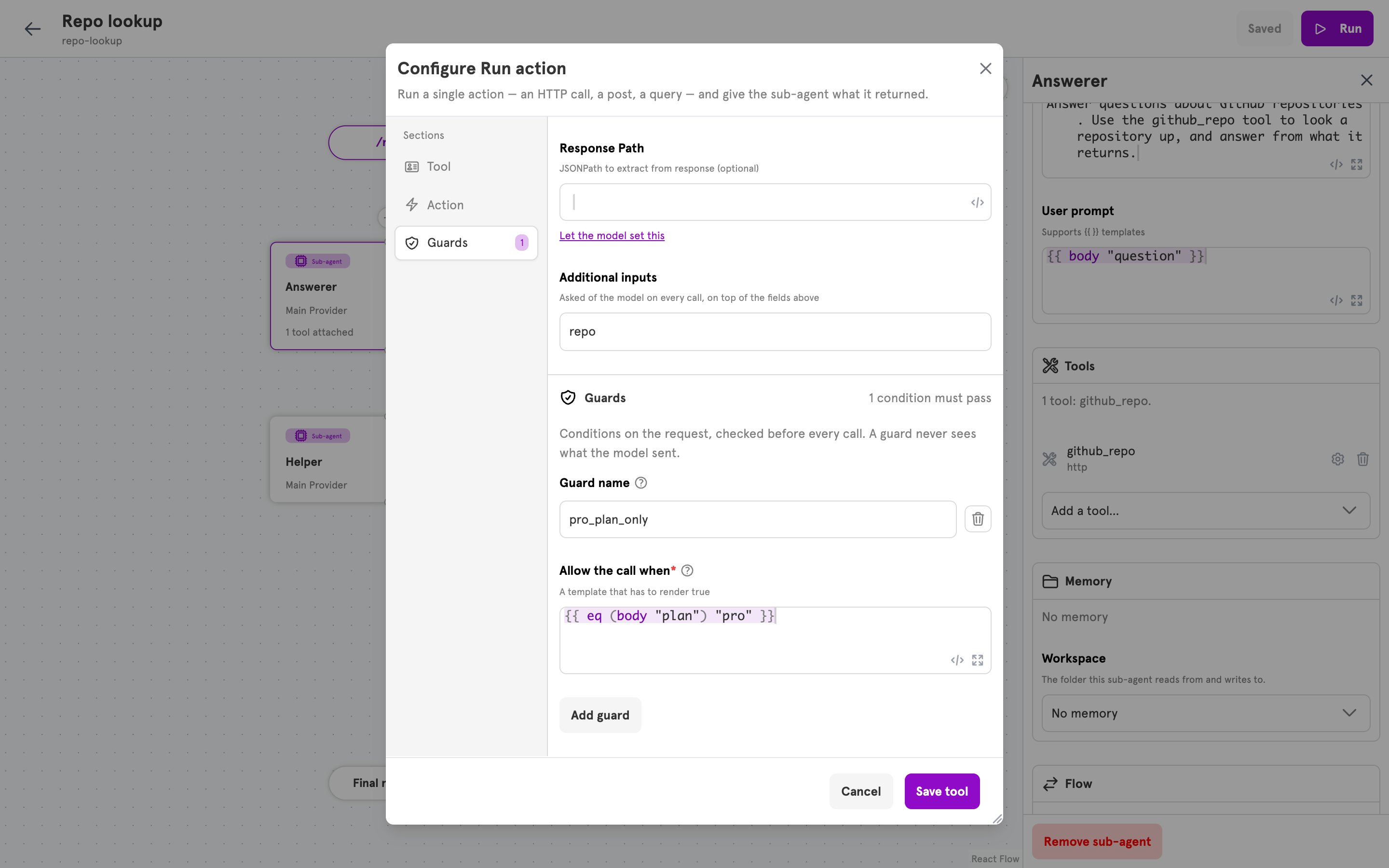 When a guard does not pass, or cannot be evaluated, the tool does not run. The model receives `tool "" is not allowed: guard "" did not pass` as the tool result, and the run's log reads "tool call denied by guard".
## Built-in tools
Every sub-agent has three file tools, with nothing to configure. They work in the sub-agent's workspace, set by `workspaceID` on the sub-agent, or **Workspace** under **Memory** in the dashboard. A sub-agent with no workspace still has them, and a call returns an error saying there is no workspace. A tool you attach under the same name replaces the built-in one.
| Tool | Inputs | Description |
| ------------ | ----------------- | --------------------------------------------------------------------------------------------- |
| `read_file` | `path` | Reads a file and returns its contents. |
| `write_file` | `path`, `content` | Writes a file, creating it or replacing what is there. |
| `list_files` | `path`, optional | Lists the files and folders one level under `path`. Without `path`, lists the workspace root. |
Paths are relative to the workspace root. A path that does not exist, or that points outside the workspace, returns a message to the model instead of an error.
## Errors
A config is checked when it is created or updated, in the dashboard, the CLI, and the MCP server. Each message is prefixed with where the tool is, such as `agent "answer" tool 0:`.
| Message | Cause |
| ------------------------------------------------------------------------------------------------- | ----------------------------------------------------------------------------------------------------------- |
| `tool type is required` | `type` is empty. |
| `unknown tool type ""` | `type` is not one of the four types. |
| `action tool requires a name` | An `action` tool has no `name`. The same check applies to `agent` and `agent_task` tools. |
| `action tool requires an action type` | `actionConfig.type` is empty. |
| `names unknown action type ""` | `actionConfig.type` is not an action this server registers. |
| `tool parameter "" must be letters, digits, underscores or hyphens` | A `params` entry holds another character. |
| `field "" has unknown kind "", expected "raw" or "param"` | A field value's `type` is neither `raw` nor `param`. |
| `field "" is filled by the model, so its value names a parameter, but it holds ` | A `param` field's `value` is not a string. |
| `field "" takes parameter "", which must be letters, digits, underscores or hyphens` | A `param` field names an input with another character. |
| `mcp tool requires an endpoint` | `mcpConfig.endpoint` is empty. |
| `mcp tool requires at least one tool name` | `mcpConfig.toolsList` is empty. |
| `mcp tool token needs exactly one of integrationId, secretId, or token` | `mcpConfig.token` sets none of the three, or more than one. |
| `references unknown agent ""` | `agentConfig.id` is not a sub-agent of the same config. |
| `agent task tool requires the id of the agent it starts` | `agentTaskConfig.id` is empty. |
| `agent task tool takes no parameters: the model supplies only the instruction` | An `agent_task` tool has `params`. |
| `guard "" routes to a step, but a guard only decides whether the tool runs` | A guard sets `onTrue` or `onFalse`. |
| `guard "": …` | The guard has neither an expression nor a structure, or its structure names a function that does not exist. |
## Related
Attach a tool in the dashboard, test it, and guard it.
The actions an action tool can run.
Template functions such as `tool_param`, `body`, and `header`.
The structured form a guard can take, and its comparison functions.
When a guard does not pass, or cannot be evaluated, the tool does not run. The model receives `tool "" is not allowed: guard "" did not pass` as the tool result, and the run's log reads "tool call denied by guard".
## Built-in tools
Every sub-agent has three file tools, with nothing to configure. They work in the sub-agent's workspace, set by `workspaceID` on the sub-agent, or **Workspace** under **Memory** in the dashboard. A sub-agent with no workspace still has them, and a call returns an error saying there is no workspace. A tool you attach under the same name replaces the built-in one.
| Tool | Inputs | Description |
| ------------ | ----------------- | --------------------------------------------------------------------------------------------- |
| `read_file` | `path` | Reads a file and returns its contents. |
| `write_file` | `path`, `content` | Writes a file, creating it or replacing what is there. |
| `list_files` | `path`, optional | Lists the files and folders one level under `path`. Without `path`, lists the workspace root. |
Paths are relative to the workspace root. A path that does not exist, or that points outside the workspace, returns a message to the model instead of an error.
## Errors
A config is checked when it is created or updated, in the dashboard, the CLI, and the MCP server. Each message is prefixed with where the tool is, such as `agent "answer" tool 0:`.
| Message | Cause |
| ------------------------------------------------------------------------------------------------- | ----------------------------------------------------------------------------------------------------------- |
| `tool type is required` | `type` is empty. |
| `unknown tool type ""` | `type` is not one of the four types. |
| `action tool requires a name` | An `action` tool has no `name`. The same check applies to `agent` and `agent_task` tools. |
| `action tool requires an action type` | `actionConfig.type` is empty. |
| `names unknown action type ""` | `actionConfig.type` is not an action this server registers. |
| `tool parameter "" must be letters, digits, underscores or hyphens` | A `params` entry holds another character. |
| `field "" has unknown kind "", expected "raw" or "param"` | A field value's `type` is neither `raw` nor `param`. |
| `field "" is filled by the model, so its value names a parameter, but it holds ` | A `param` field's `value` is not a string. |
| `field "" takes parameter "", which must be letters, digits, underscores or hyphens` | A `param` field names an input with another character. |
| `mcp tool requires an endpoint` | `mcpConfig.endpoint` is empty. |
| `mcp tool requires at least one tool name` | `mcpConfig.toolsList` is empty. |
| `mcp tool token needs exactly one of integrationId, secretId, or token` | `mcpConfig.token` sets none of the three, or more than one. |
| `references unknown agent ""` | `agentConfig.id` is not a sub-agent of the same config. |
| `agent task tool requires the id of the agent it starts` | `agentTaskConfig.id` is empty. |
| `agent task tool takes no parameters: the model supplies only the instruction` | An `agent_task` tool has `params`. |
| `guard "" routes to a step, but a guard only decides whether the tool runs` | A guard sets `onTrue` or `onFalse`. |
| `guard "": …` | The guard has neither an expression nor a structure, or its structure names a function that does not exist. |
## Related
Attach a tool in the dashboard, test it, and guard it.
The actions an action tool can run.
Template functions such as `tool_param`, `body`, and `header`.
The structured form a guard can take, and its comparison functions.