Actions are the core building blocks of ServFlow workflows. They perform discrete operations such as fetching data from a database, calling external APIs, running AI agents, or transforming values. Every workflow consists of an entry point, one or more actions, and a response. You can configure actions in two ways:
  • Dashboard UI — Visual drag-and-drop interface for building workflows
  • YAML Configuration — Code-based configuration files for version control and advanced setups
For detailed documentation on each action type, see the Actions reference pages.

Actions in the Dashboard UI

The ServFlow dashboard provides a visual interface for adding and configuring actions in your workflows.

Adding an Action Node

To add an action to your workflow:
  1. Click the + button below an existing node in the workflow canvas
  2. Select Actions from the node type options
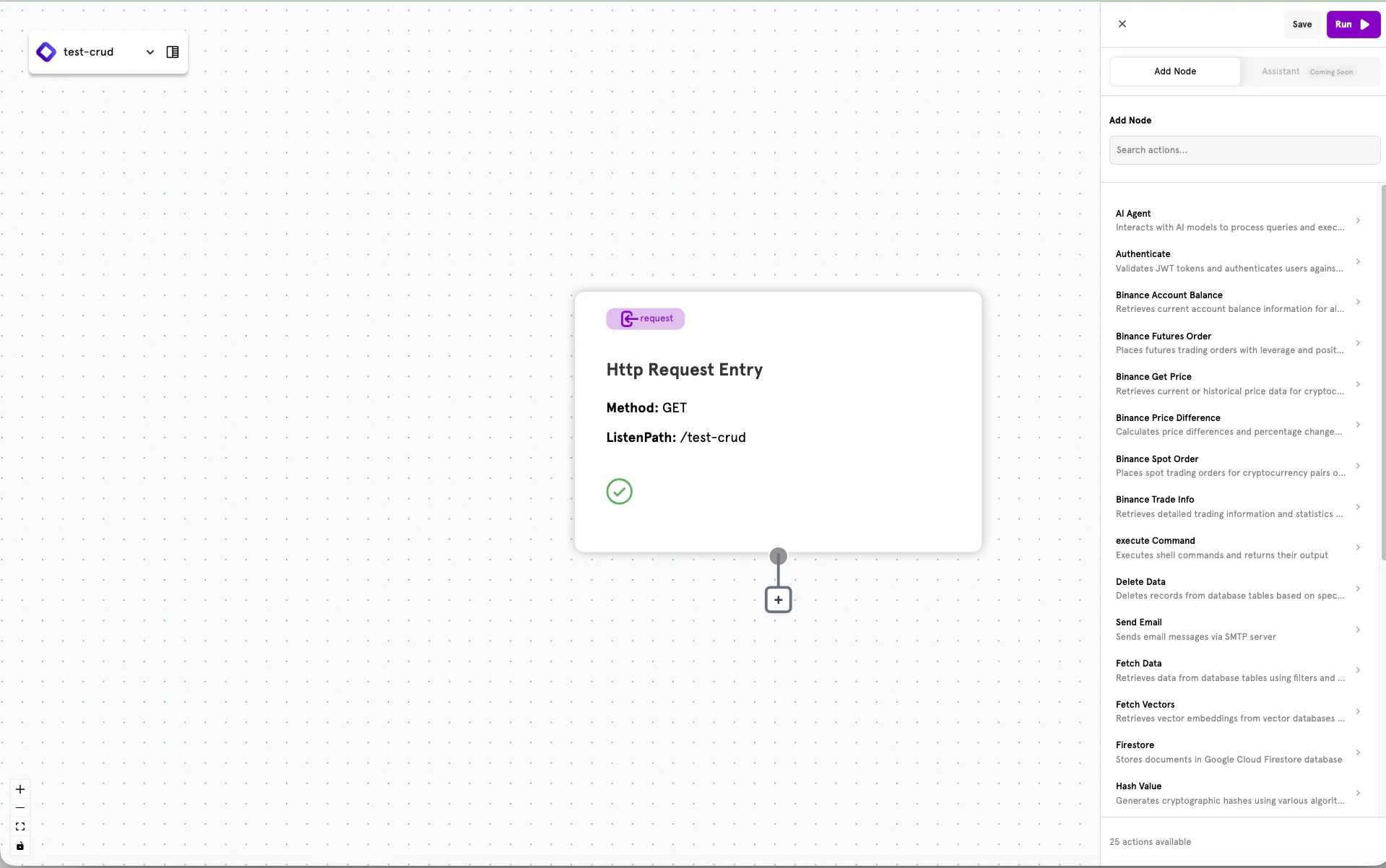
  3. Browse the list of available actions in the sidebar

Browsing Available Actions

When you click to add an action, a sidebar panel displays all available action types. Each action shows its name and a brief description of what it does.
Available actions list in the ServFlow dashboard sidebar

Configuring an Action

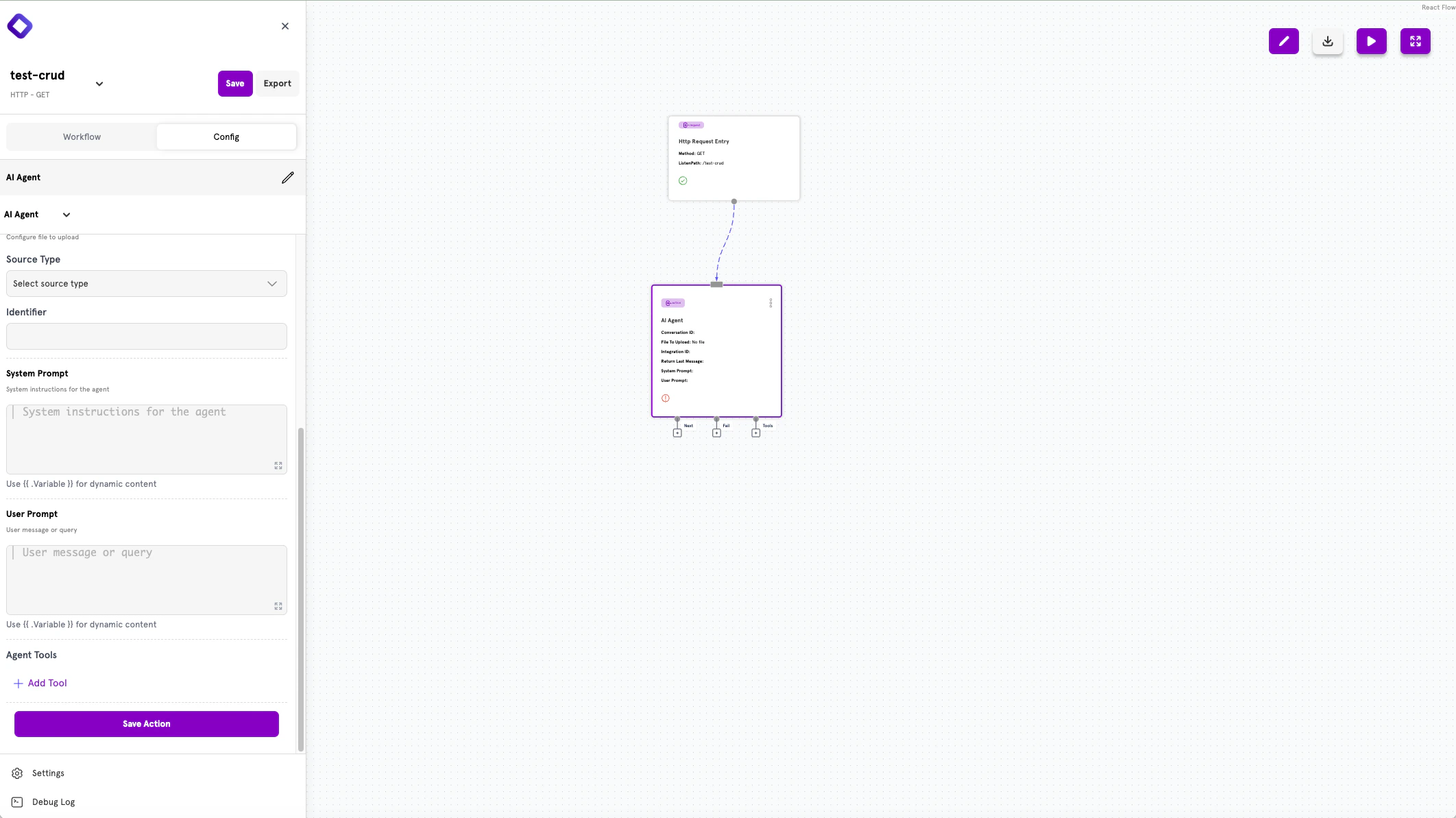
Selecting an action opens the configuration panel on the left side of the screen. Each action type has specific fields to configure.
Action configuration panel showing AI Agent settings
The configuration panel displays:
  • Action type — The selected action (e.g., AI Agent)
  • Configuration fields — Type-specific settings such as identifiers, prompts, or connection details
  • Save Action — Button to save your configuration
Use {{ .Variable }} syntax in input fields to reference dynamic content from previous actions or request parameters.

Connecting Actions

Actions have output handles that let you define the flow:
  • Next — Where to route on successful completion
  • Fail — Where to route when an error occurs
  • Tools — Additional outputs for specific action types (e.g., AI Agent tools)
Drag connections from these handles to other actions, conditionals, or response nodes to build your workflow logic.

Using Action Results

When an action completes, its result is stored and can be referenced by subsequent nodes. Use the {{ .Variable }} syntax in any input field to access these values. For example, if an action with ID get_user returns user data, you can access the email field in a later action with {{ .get_user.email }}.

Actions in YAML Configuration

For code-based workflows, actions are defined in YAML configuration files. This approach is ideal for version control, complex workflows, and programmatic configuration.

Action Structure

Every action follows this structure:
actions:
  action_id:
    type: action_type
    config:
      # type-specific configuration
    next: action.next_step
    fail: response.error
The action_id is a unique identifier you choose for the action. You’ll use this ID to reference the action’s results in other parts of your workflow.

Common Fields

FieldTypeRequiredDescription
typestringYesThe action type identifier (e.g., fetch, http, agent)
configobjectNoType-specific configuration options
nextstringNoStep to execute on success
failstringNoStep to execute on failure

Chaining Actions

Use the next and fail fields to define your workflow’s execution path:
  • next — Routes to another step when the action succeeds
  • fail — Routes to an error handler when the action fails
The routing syntax follows the pattern type.identifier:
  • action.other_action — Route to another action
  • conditional.check_value — Route to a conditional branch
  • response.success — Route to a response

Accessing Action Results

Action results are stored under the action’s ID and can be accessed using template syntax:
# Access the full result from action 'fetch_user'
value: "{{ .fetch_user }}"

# Access a nested field
value: "{{ .fetch_user.email }}"

# Use in expressions
expression: "{{ gt (len .fetch_user) 0 }}"
Here’s an example of chaining actions where the second action uses data from the first:
actions:
  get_user:
    type: fetch
    config:
      integrationID: my_database
      table: users
      filters:
        - field: id
          operator: eq
          value: "{{ param \"user_id\" }}"
      single: true
    next: action.send_welcome

  send_welcome:
    type: email
    config:
      recipientEmail: "{{ .get_user.email }}"
      subject: "Welcome!"
      content: "Hello {{ .get_user.name }}, welcome to our platform."
    next: response.success

Available Actions

ServFlow provides a comprehensive set of actions organized by category. Click through to the detailed reference pages for full configuration options and examples.

Data Operations

ActionDescription
fetchRetrieves data from a database table
storeStores a new record in a database table
updateUpdates existing records
deleteDeletes records from a database table
mongoqueryExecutes native MongoDB queries

Vector Operations

ActionDescription
storevectorStores vector embeddings
fetchvectorsQueries vectors for similarity search

HTTP & External APIs

ActionDescription
httpMakes HTTP requests to external APIs

Authentication & Security

ActionDescription
authenticateValidates JWT tokens and fetches user data
jwtEncodes or decodes JWT tokens
hashHashes values using bcrypt

Transformation & Logic

ActionDescription
javascriptExecutes custom JavaScript code
staticReturns a static or computed value

AI & Agents

ActionDescription
agentInteracts with AI models

Flow Control

ActionDescription
parallelExecutes multiple actions simultaneously

Communication

ActionDescription
emailSends email messages via SMTP

System

ActionDescription
commandExecutes shell commands

Memory

ActionDescription
memory_storeStores data in temporary memory
memory_fetchRetrieves data from temporary memory

Binance Trading

ActionDescription
binance/getpriceGets cryptocurrency price data
binance/accountbalanceQueries Binance account balances
binance/spotorderPlaces spot trading orders
binance/futuresorderPlaces futures orders
binance/pricedifferenceCalculates price changes
binance/tradeinfoGets order and position info

Next Steps

Actions Overview

Explore the complete actions reference documentation.

Quickstart

See actions in practice by building your first API.

Configuration Reference

Explore all ServFlow configuration options.

Secrets Management

Securely store credentials used by your actions.