- Dashboard UI — Visual interface for building workflows by selecting action types and filling in configuration fields. Best for learning, prototyping, and rapid development.
- YAML Configuration — Code-based configuration files for version control, CI/CD pipelines, and production deployments.
Working with Actions in the Dashboard
The ServFlow dashboard provides a visual interface for adding and configuring actions in your workflows.Adding an Action
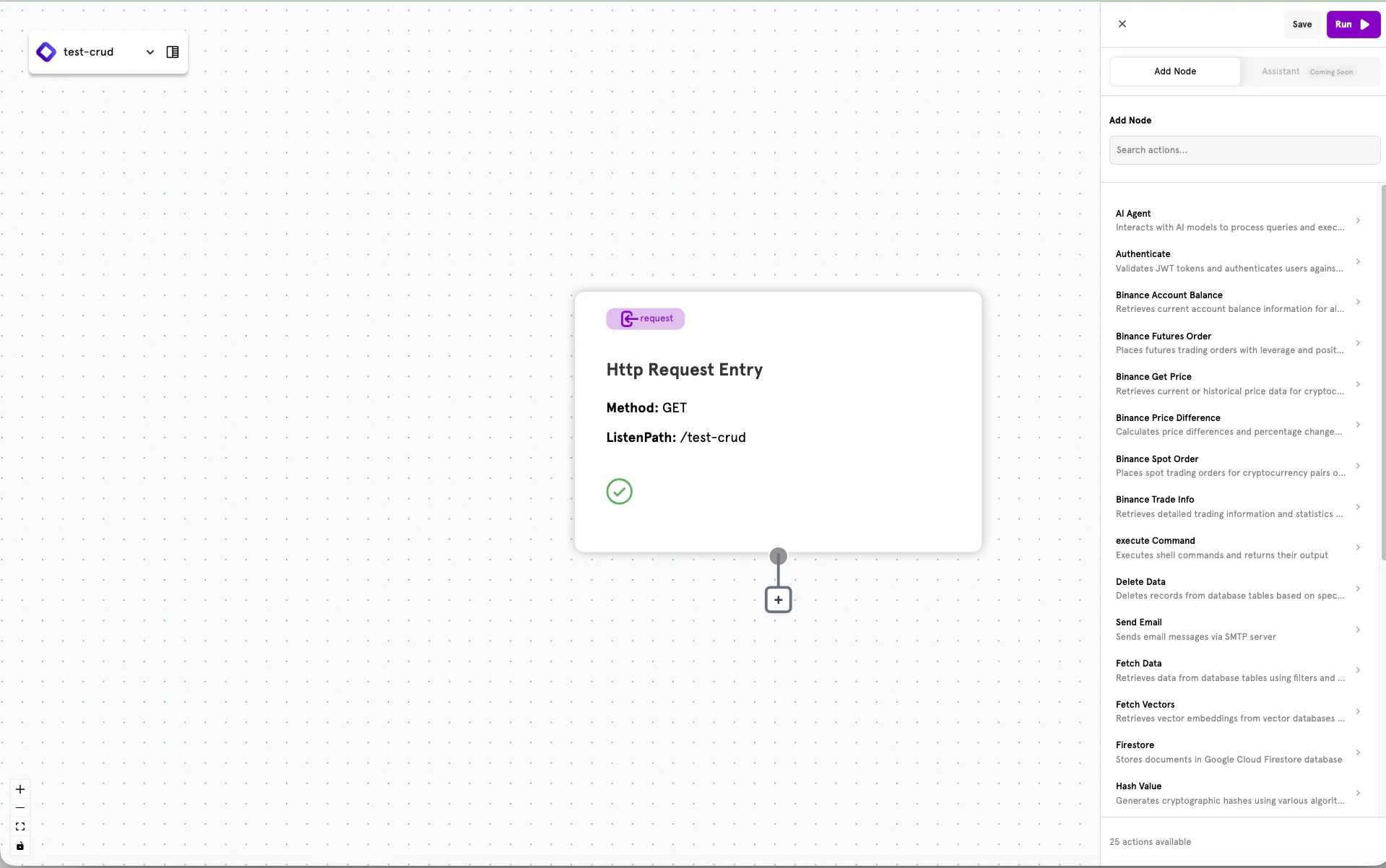
To add an action to your workflow:- Click the + button below an existing node in the workflow canvas
- Select Actions from the node type options
- Browse the list of available actions in the sidebar
Browsing Available Actions
When you click to add an action, a sidebar panel displays all available action types. Each action shows its name and a brief description of what it does.
Configuring an Action
Selecting an action opens the configuration panel on the left side of the screen. Each action type has specific fields to configure.
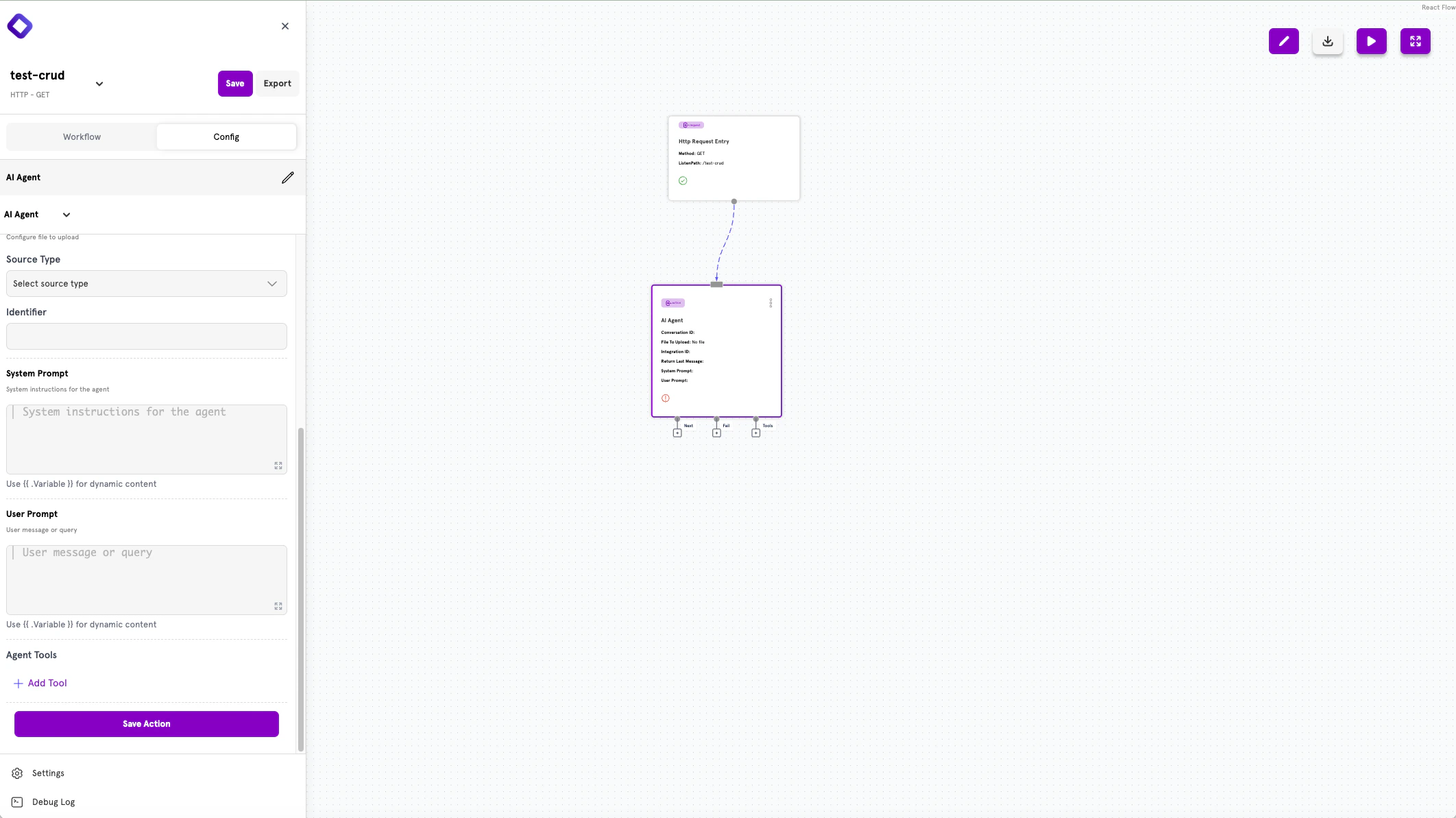
- Action type — The selected action (e.g., AI Agent)
- Configuration fields — Type-specific settings such as identifiers, prompts, or connection details
- Save Action — Button to save your configuration
Action Outputs
Actions have output handles that let you define the flow:- Next — Where to route on successful completion
- Fail — Where to route when an error occurs
- Tools — Additional outputs for specific action types (e.g., AI Agent tools)
YAML Configuration
Actions can also be defined directly in YAML configuration files. This approach is preferred for:- Version control — Track API changes in Git
- CI/CD pipelines — Deploy configurations automatically
- Production deployments — Run in Headless Mode without the dashboard
- Programmatic generation — Generate configs from code or templates
Action Structure
Every action follows this structure in YAML:action_id is a unique identifier you choose for the action. You’ll use this ID to reference the action’s results in other parts of your workflow.
Common Fields
| Field | Type | Required | Description |
|---|---|---|---|
type | string | Yes | The action type identifier (e.g., fetch, http, agent) |
config | object | No | Type-specific configuration options |
next | string | No | Step to execute on success |
fail | string | No | Step to execute on failure |
Chaining Actions
Use thenext and fail fields to define your workflow’s execution path:
next— Routes to another step when the action succeedsfail— Routes to an error handler when the action fails
type.identifier:
action.other_action— Route to another actionconditional.check_value— Route to a conditional branchresponse.success— Route to a response
Accessing Action Results
When an action completes, its result is stored and can be referenced by subsequent nodes. Use the{{ .action_id }} syntax to access these values.
get_user returns user data, you can access the email field in a later action with {{ .get_user.email }}.
Filter Syntax
Several actions use filters to query data. Filters follow this structure:Available Operators
| Operator | Description |
|---|---|
eq | Equal to |
ne | Not equal to |
gt | Greater than |
gte | Greater than or equal |
lt | Less than |
lte | Less than or equal |
in | Value in array |
nin | Value not in array |
Available Actions
ServFlow provides actions organized by category:Data Operations
| Action | Description |
|---|---|
fetch | Retrieves data from a database table |
store | Stores a new record in a database table |
update | Updates existing records |
delete | Deletes records from a database table |
mongoquery | Executes native MongoDB queries |
Vector Operations
| Action | Description |
|---|---|
storevector | Stores vector embeddings |
fetchvectors | Queries vectors for similarity search |
HTTP & External APIs
| Action | Description |
|---|---|
http | Makes HTTP requests to external APIs |
Authentication & Security
| Action | Description |
|---|---|
authenticate | Validates JWT tokens and fetches user data |
jwt | Encodes or decodes JWT tokens |
hash | Hashes values using bcrypt |
Transformation & Logic
| Action | Description |
|---|---|
javascript | Executes custom JavaScript code |
static | Returns a static or computed value |
AI & Agents
| Action | Description |
|---|---|
agent | Interacts with AI models |
Flow Control
| Action | Description |
|---|---|
parallel | Executes multiple actions simultaneously |
Communication
| Action | Description |
|---|---|
email | Sends email messages via SMTP |
System
| Action | Description |
|---|---|
command | Executes shell commands |
Memory
| Action | Description |
|---|---|
memory_store | Stores data in temporary memory |
memory_fetch | Retrieves data from temporary memory |
Binance Trading
| Action | Description |
|---|---|
binance/getprice | Gets cryptocurrency price data |
binance/accountbalance | Queries Binance account balances |
binance/spotorder | Places spot trading orders |
binance/futuresorder | Places futures orders |
binance/pricedifference | Calculates price changes |
binance/tradeinfo | Gets order and position info |
Next Steps
Data Operations
Learn how to fetch, store, update, and delete data.
HTTP Requests
Call external APIs from your workflows.
AI Agents
Integrate AI models into your workflows.
Conditionals
Add branching logic to your workflows.