Conditionals are decision points in ServFlow workflows that evaluate expressions and route execution to different paths based on the result. They enable you to create dynamic workflows that respond differently based on input data, action results, or any other runtime values. For information on how conditionals fit into the overall execution flow, see the Actions documentation.

Adding a Conditional to Your Workflow

To add a conditional to your workflow in the ServFlow dashboard:
  1. Click the + button below an existing node in the workflow canvas
  2. Select Branch from the node type options
  3. The conditional node will be added with True and False output handles
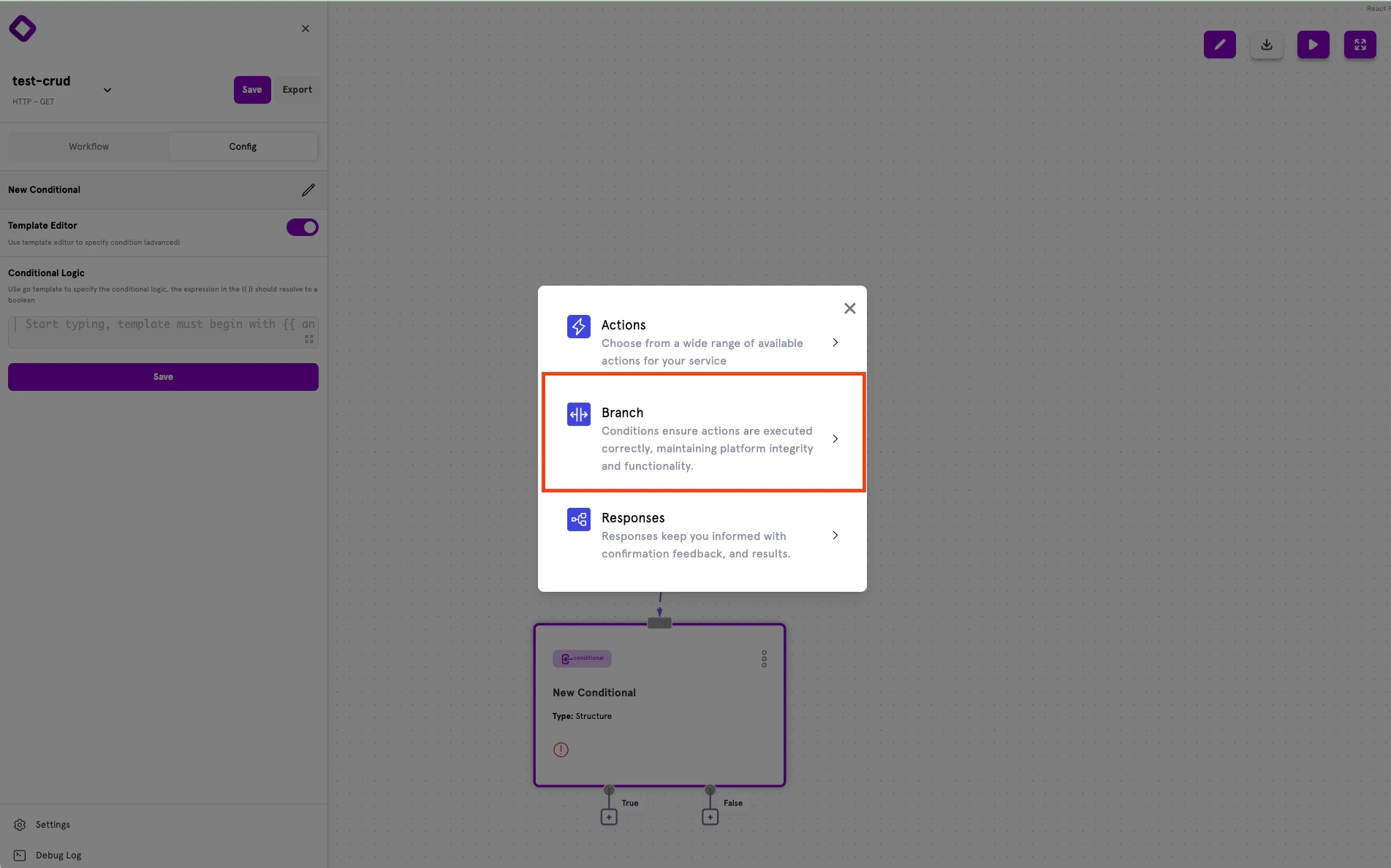
Node type selection showing Branch option for adding conditionals

Conditional Outputs

Every conditional node has two output handles that determine the flow based on evaluation:
  • True — The path taken when the condition evaluates to true
  • False — The path taken when the condition evaluates to false
Drag connections from these handles to other actions, conditionals, or response nodes to define your workflow’s branching logic.

Configuring Conditions

Selecting a conditional node opens the configuration panel on the left side of the screen. ServFlow offers two configuration modes:
  • Structured Mode (Default) — Form-based interface for building conditions visually
  • Template Editor (Advanced) — Write Go template expressions directly for complex logic
Structured Mode is recommended for most use cases.

Structured Mode

Structured mode provides a form-based interface for building conditions without writing template expressions manually.
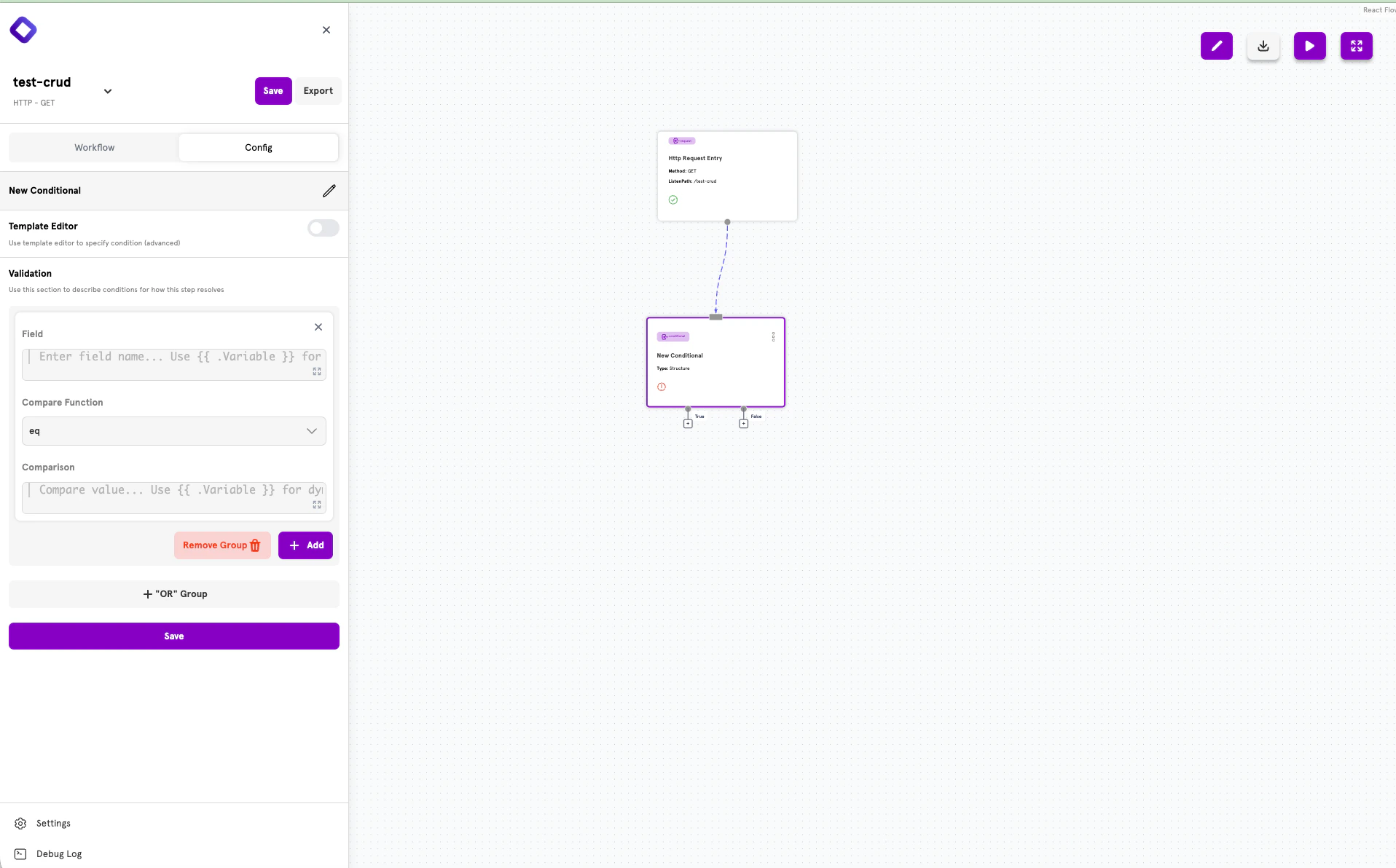
Structured conditional configuration with field, compare function, and comparison value
The configuration panel displays:
  • Field — The value to evaluate (use {{ .Variable }} for dynamic values)
  • Compare Function — The comparison operation (eq, ne, gt, lt, etc.)
  • Comparison — The value to compare against

Combining Conditions with AND

To require multiple conditions to all be true, add them to the same group using the + Add button.
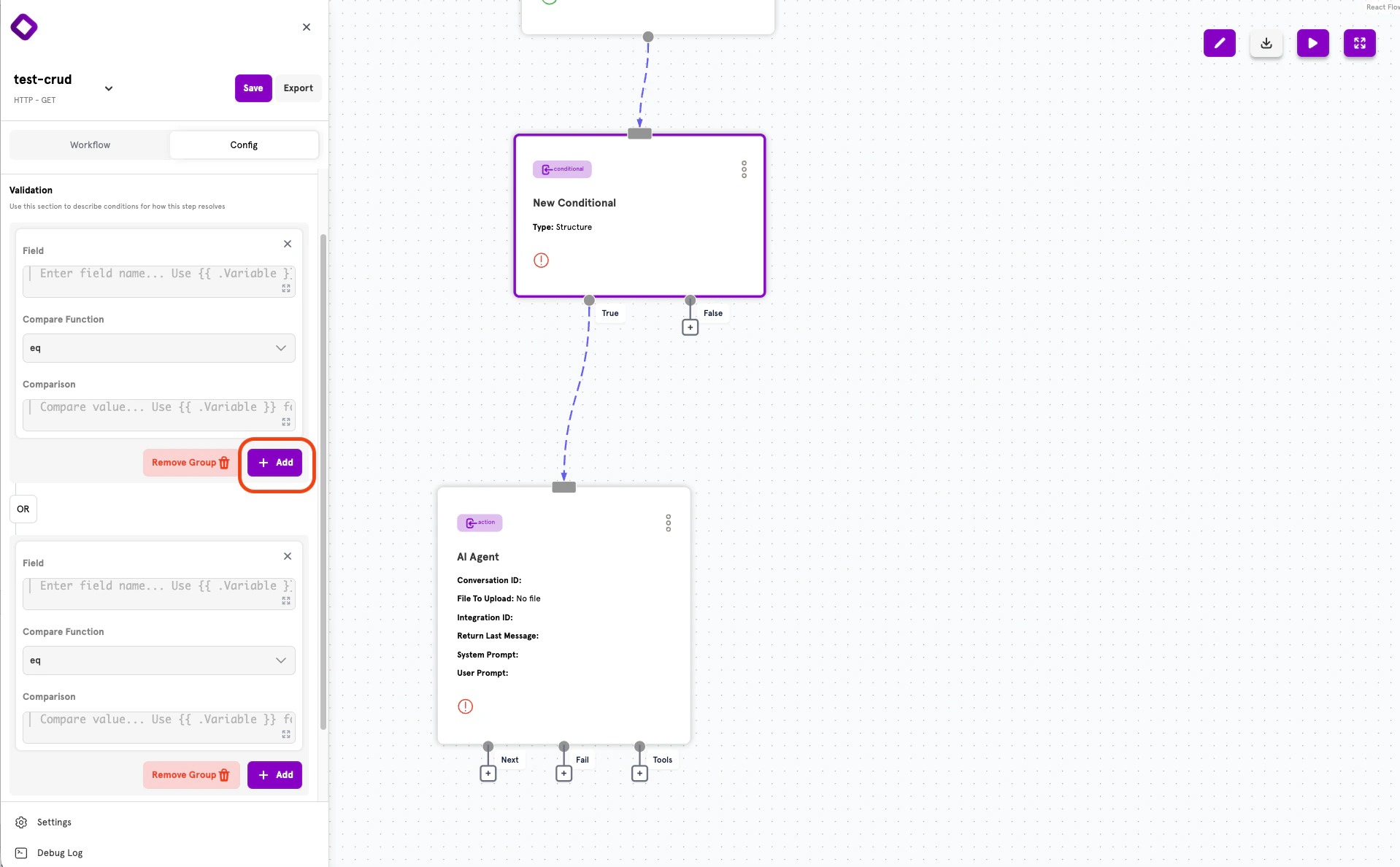
The + Add button to add another condition with AND logic
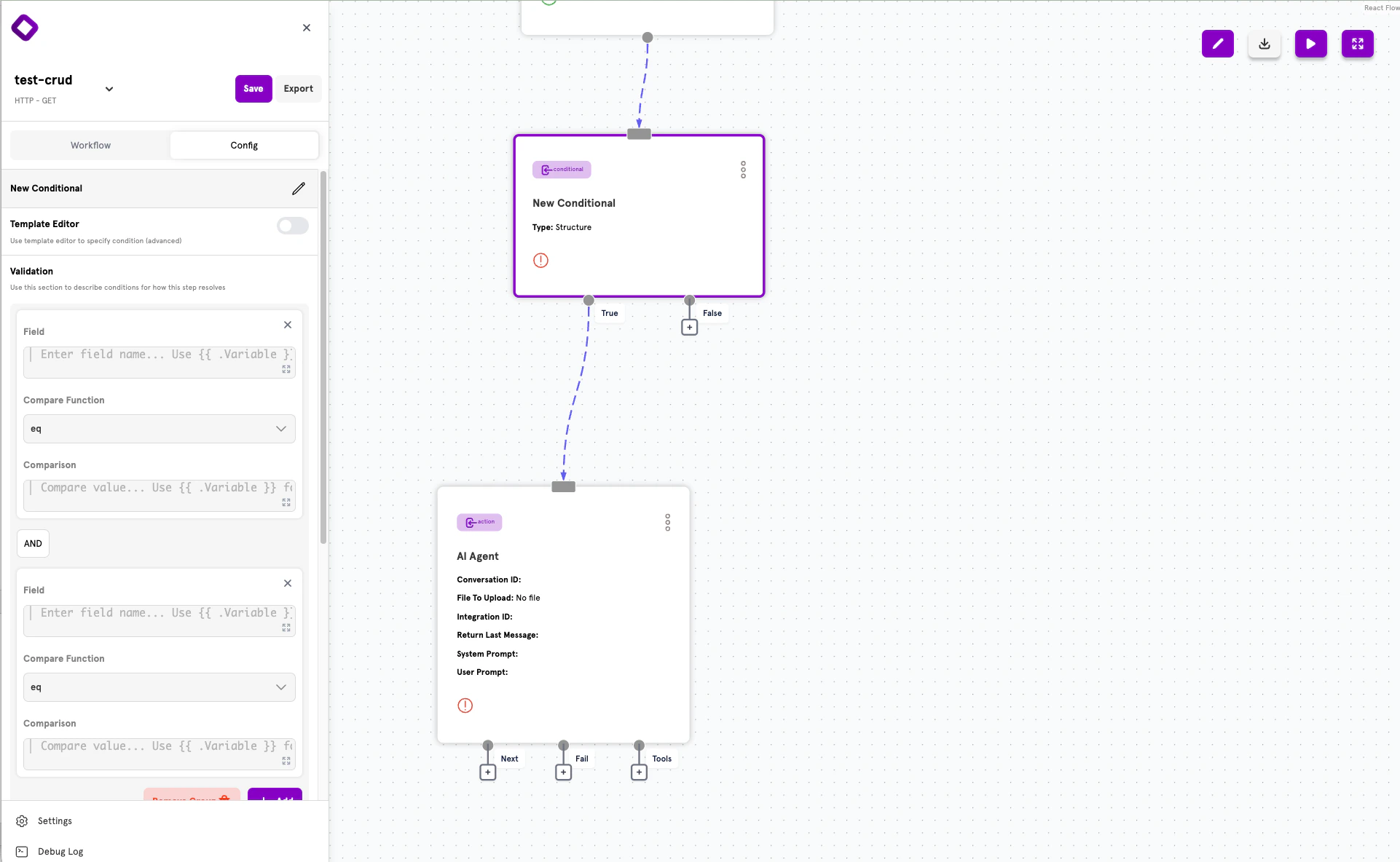
After clicking + Add, a new condition appears in the same group, connected by AND logic:
Two conditions combined with AND logic in a single group
All conditions within a group must evaluate to true for the group to be true.

Creating OR Groups

To create alternative conditions where only one needs to be true, click + “OR” Group to add a new condition group. Groups are connected by OR logic — the overall conditional evaluates to true if any group evaluates to true.

How the Logic Works

ServFlow uses Disjunctive Normal Form (DNF) for combining conditions:
  • Within a group: Conditions are combined with AND (all must be true)
  • Between groups: Groups are combined with OR (any can be true)
For example, if you have:
  • Group 1: Condition A AND Condition B
  • Group 2: Condition C AND Condition D
The overall logic is: (A AND B) OR (C AND D) This means the conditional evaluates to true if either:
  • Both A and B are true, OR
  • Both C and D are true

Validation Functions

These functions are available for comparing and validating values in your conditions.
FunctionDescriptionRequires Comparison
eqChecks if two values are equalYes
neChecks if two values are not equalYes
gtGreater than comparisonYes
geGreater than or equalYes
ltLess than comparisonYes
leLess than or equalYes
emailValidates email formatNo
notemptyChecks value is not emptyNo
emptyChecks value is emptyNo
bcryptCompares plain text against bcrypt hashYes
Functions like email, notempty, and bcrypt can collect validation errors automatically. See Validation Error Collection for details.

Advanced: Template Editor

For complex expressions that can’t be built with Structured Mode, toggle Template Editor to write Go template expressions directly.
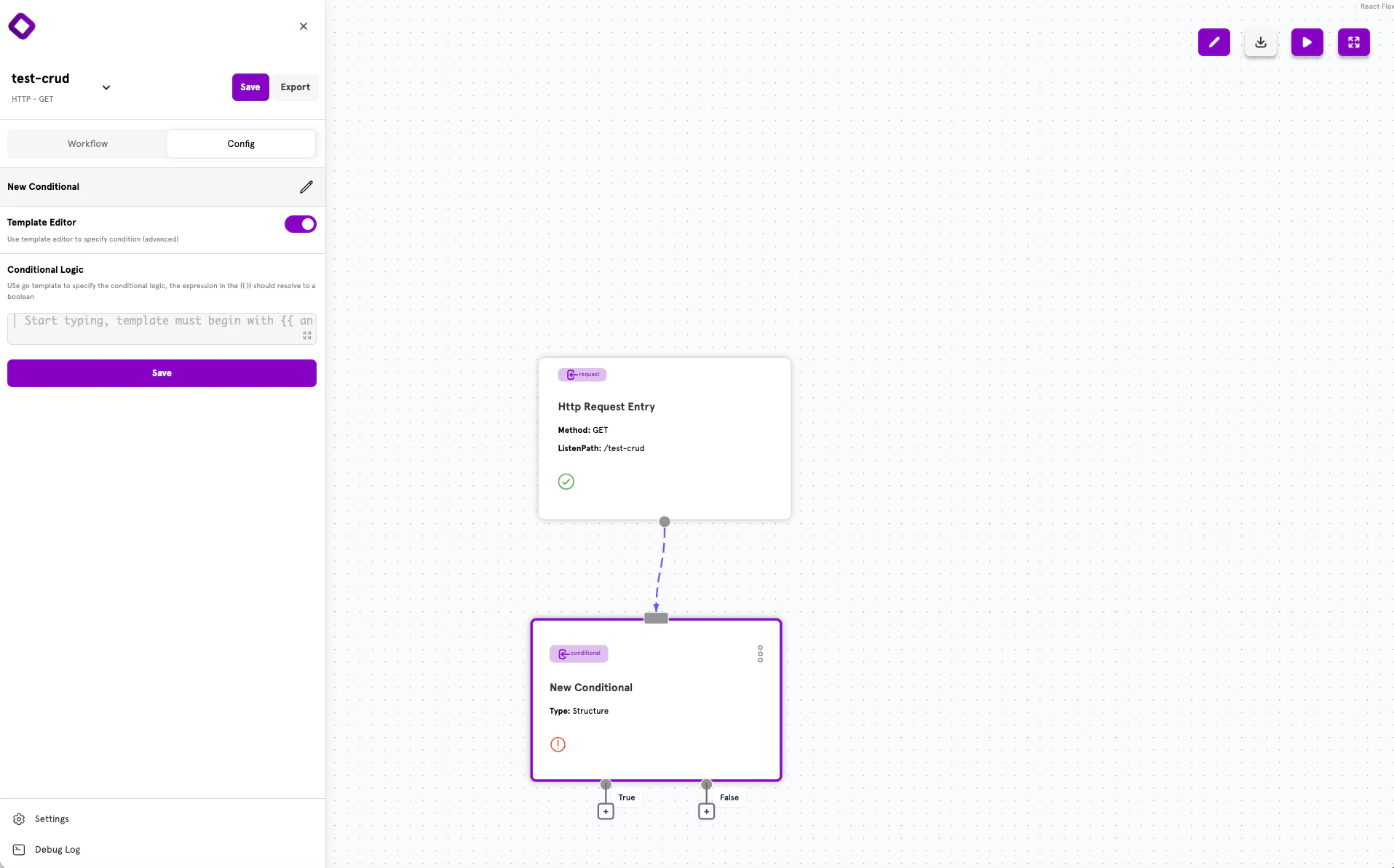
Template editor mode for writing custom conditional expressions
In template mode, write expressions that evaluate to a boolean value. The expression must be wrapped in {{ }} template delimiters.

When to Use Template Editor

  • Nested conditional logic
  • Complex AND/OR combinations beyond what Structured Mode supports
  • Custom validation functions
  • Mathematical expressions

Template Expression Examples

# Simple equality check
{{ eq .user.role "admin" }}

# Greater than with length
{{ gt (len .fetch_results) 0 }}

# Combined AND logic
{{ and (eq .status "active") (gt .balance 0) }}

# Combined OR logic
{{ or (eq .user.role "admin") (eq .user.role "moderator") }}

# Nested logic
{{ or (eq .user.role "admin") (and (eq .resource.owner_id .user.id) (eq .resource.status "published")) }}

Advanced: YAML Configuration

ServFlow APIs can also be defined using YAML configuration files. This approach is useful for version control, CI/CD pipelines, or programmatic configuration generation.

Conditional Structure

Every conditional follows this structure in YAML:
conditionals:
  conditional_id:
    expression: "{{ eq .status \"active\" }}"
    onTrue: action.process_active
    onFalse: response.inactive
    type: template

Common Fields

FieldTypeRequiredDescription
expressionstringYes*Template expression that evaluates to true or false
onTruestringNoStep to execute if expression evaluates to true
onFalsestringNoStep to execute if expression evaluates to false
typestringNoConditional type: template (default) or structured
structurearrayNoStructured condition definition (for structured type)
*Required for template type; structure is required for structured type.

Routing Syntax

The onTrue and onFalse fields use the standard step reference syntax:
  • action.action_id — Route to an action
  • conditional.conditional_id — Route to another conditional
  • response.response_id — Route to a response

Template Conditionals

Template conditionals use Go template expressions:
conditionals:
  is_admin:
    type: template
    expression: "{{ eq .user.role \"admin\" }}"
    onTrue: action.admin_action
    onFalse: response.forbidden

Structured Conditionals

Structured conditionals use a visual-friendly format with nested arrays for AND/OR logic:
conditionals:
  validate_input:
    type: structured
    structure:
      - - content: .email
          function: email
          title: Email
        - content: .password
          function: notempty
          title: Password
    onTrue: action.create_user
    onFalse: response.validation_error
Logic structure:
  • Items in the same inner array are combined with AND
  • Inner arrays are combined with OR

Structured Condition Item Fields

FieldTypeRequiredDescription
contentstringYesRaw template expression to evaluate (no curly braces)
functionstringYesThe validation function to use
comparisonstringNoRaw template expression for comparison functions (no curly braces)
titlestringNoField name for validation error messages

Common YAML Patterns

Input Validation:
conditionals:
  validate_registration:
    expression: |
      {{ and
        (notempty (param "email") "Email" true)
        (email (param "email") "Email")
        (notempty (param "password") "Password" true)
      }}
    onTrue: action.create_user
    onFalse: response.validation_error
Checking if Data Exists:
conditionals:
  user_exists:
    expression: "{{ gt (len .fetch_user) 0 }}"
    onTrue: response.user_already_exists
    onFalse: action.create_user
Role-Based Access Control:
conditionals:
  is_privileged:
    expression: |
      {{ or
        (eq .user.role "admin")
        (eq .user.role "moderator")
      }}
    onTrue: action.privileged_action
    onFalse: response.forbidden
Password Verification:
conditionals:
  verify_password:
    expression: "{{ bcrypt (param \"password\") .user.password \"Password\" }}"
    onTrue: action.generate_token
    onFalse: response.invalid_credentials

Validation Error Collection

When validation functions like notempty, email, and bcrypt include a title parameter, validation errors are automatically collected. Access these errors in responses using the .errors variable.
conditionals:
  validate:
    expression: |
      {{ and
        (notempty (param "email") "Email" true)
        (email (param "email") "Email")
        (notempty (param "password") "Password" true)
      }}
    onTrue: action.create_user
    onFalse: response.validation_error

responses:
  validation_error:
    code: 400
    responseObject:
      fields:
        success:
          value: "false"
        errors:
          value: "{{ .errors }}"
This returns a response like:
{
  "success": false,
  "errors": ["Email is required", "Password is required"]
}

Next Steps

Actions

Learn about actions — the building blocks of workflows.

Dynamic Content

Use template syntax to create dynamic values.

Configuration Reference

See the complete ServFlow configuration options.

Secrets Management

Securely store credentials used in your conditionals.